|
|
|
|
|
|
|
|
|
 Posted: Tue Jul 10, 2007 1:56 pm Posted: Tue Jul 10, 2007 1:56 pm
This thread will have helpful guides for you.
Table of Contents:
Dream Avi Guide
Posting Pics Guide
Taking Screenshots Guide
How to Make Gold Guide
Literacy
Making an RP Character
|
 |
|
|
|
|
|
|
|
|
|
|
|
|
|
Posted: Tue Jul 10, 2007 1:57 pm
Making dream avatars is very simple.
First: Go to tektek.org. When the screen comes up, it should look like this

Second: Click "Dream Avatar Creator"
Third: When the screen (from the picture below) comes up, click the start button
The rest should be smooth sailing from there.
|
|
|
|
|
|
|
|
|
|
|
|
|
|
|
|
|
|
Posted: Tue Jul 10, 2007 2:10 pm
Posting PicturesFirst: Get a picture (using tinypic.com)
Second: Go to tinypic.com
Third: Click "browse" then find your picture. Once you've selected your picture, press "Upload Now"
Fourth: Then copy the link.
Fifth: Paste the link wherever you're trying to post the picture.
|
|
|
|
|
|
|
|
|
|
|
|
|
|
|
Posted: Tue Jul 10, 2007 2:15 pm
Taking ScreenshotsDino Screencaps for Windows XP, 2000, ME, 98, 95To take a screenshot on Windows XP or 2000, press the "Print Screen" button on your keyboard. (Image courtesy of Chema) 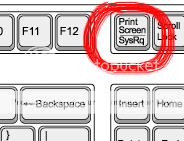 This will take a snapshot of your entire screen, and put the information into your clipboard. You will still need to save it somewhere. Go to: Start --> Program Files --> Accessories --> Paint (Image courtesy of [Sparrow]) 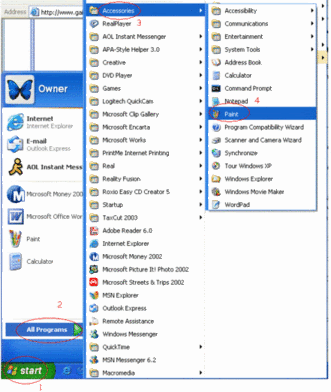 Then: Edit --> Paste (or ctrl + v). On Windows 2000, it will prompt you to increase the size of the image. Click "Yes." On Windows XP, the image size is increased automatically. You can either save this as-is, and have a full image of your whole screen, or you can use the Lasso or + selection tool to select an area that you want to keep. Once you've got the exact selection of what you're keeping go: Edit --> Copy File --> New Click on Don't save Now you've got a blank file. Go: Edit --> Paste You're now left with the exact thing you'd like to save. Go to: File --> Save as ... (Image courtesy of -Listan-) Where it lets you choose the type of file, I would reccomend using a JPG, unless the image's quality matters. In that case, save it as a PNG to maintain as high an image quality as you can possibly get. For most cases, a JPG will do the trick. Remember the location you saved it in, and hit the save button. (Image courtesy of -Listan-) Go to www.tinypic.com for a free image hosting site. Choose the file you'd like hosted, and click "host it!" Tinypic will give you all the links you'll need to share your picture with others. Because I am on a mac, I don't have screenshots for the Windows machines. If someone has those screenshots avaialable, I'll add them in here, and I will credit you.
|
|
|
|
|
|
|
|
|
|
|
|
|
|
|
|
|
|
Posted: Tue Jul 10, 2007 2:17 pm
How to Make Gold*Starlight*
arrow Browsing.
You get gold just by flicking from page to page or 'lurking' but not very much. 1-5g
arrow Polls.
Most people like this method, because...well it's so easy. Voting in polls (like the one in this thread) normally gets you 1-14g a time.
arrow Fishing/ Casino games.
They're fun to play and you can either sell the tickets/ fish ( to other players and the shops) or save up and excange them for items you can sell for a profit.
arrow Word Bump / Puzzles
A newish game. You get money for completing every level (or puzzle) and this increases as it gets harder. You may even get some items.
arrow Towns.
You can shake rocks, trees and bushes for up to 10g a time. You can also collect bugs, trash and flowers to sell. You can also exchange them for items.
arrow Posting.
Yep, posting in threads gets you anywhere from 1-50g.
arrow Commenting profiles.
Anywhere from 1-32g.
arrow Voting/ commenting in arenas.
Voting = 1-20g
Commenting = 1-32g, Thankyou to 3cmrgx3 III for this information.
I've skimmed over the main ways of gold making, there are more tricky ones which I will now detail.
arrow Item exchanging.
Very tricky, but the profits can be very good. It involves buying items for cheap prices and then selling them for a profit.
arrow Art/other services.
If you are blessed enough to be an artist then you can sell your work for gold. Prices vary, depending how good you are.
|
|
|
|
|
|
|
|
|
|
|
|
|
|
|
Posted: Tue Jul 10, 2007 3:25 pm
Gaia LiteracyLiteracy is very important when posting.Update There are a few things that a lot of new members do that is not considered proper among most Gaians, and here are a few of them to help you out. 'Txt Tlkng'I see lots and lots and lots of newbies doing this, using numbers and single letters, shortened words and acronyms to post, as if it were a chat room. This is looked down upon quite a bit. Gaia isn't a chatroom site, it's a forum board. You have plenty of time to type it out, please try to do so. This includes not doing things like using looooooooooooooooooooooooooooooooooooots of characters in a word, talkin lyk ths, using numbers 2 talk, and USING ALL CAPS (Or not capitalizing when appropriate). OMG!!!!11!!!1111!!!!ONE!7!SEVEN!I see this too much. It gives me a headache. Please, no more than 3 exclamation marks, it's rather rude to have a long string of meaningless mumbo-jumbo after a sentence. It annoys people, and they yell at you. Emoticon over-useNothing bugs people quite as much as people that use millions of emoticons (Smilies) in their post. A common example is "Please help me I'm poor!! crying crying crying crying crying crying crying ", or such like that. One is quite sufficient. (To be honest, most people dislike seeing the crying emote at all.) Disabled PM'sI can't count the number of times I've seen this. People go around the forums, talking, and ask someone to PM them about something or another, and then they have their PM's disabled. When no one can PM you, it's impossible for people to give you help or offers, or talk to you in private. To make sure your PM's are not disabled, go to Profile>Mail>Receive private messages>Yes Random Friend RequestsI advise against this, even though many people do it. It usually annoys other members, especially if you use it to pounce on them as soon as they're online with a 'was up' PM. Random PM'sWhile these are okay most of the time, I heavily recommend that you only PM people if you have a reason. If you're just looking to chat with someone, there are millions of threads in the Chatterbox forum, full of people doing just that. Random TradesIf you are sending new trades to people, it's usually a good idea to let them know why. If not, they'll just cancel it, and might even block you for harassing them about it. If you're asking for donations, there are forums for that, if you're trying to buy something, clarify by PM before sending the trade. Multiple ThreadsEspecially in guilds, this can get annoying. You only need to make one thread on a subject, especially if it's just asking for gold, or advertising a quest. Posting in the Wrong ForumOften times, when a newbie has a question, they will simply go to somewhere like 'Welcome to Gaia' or 'General Discussion'. This annoys the Welcomers, and GDers ( General Discussion Forum post ers) will flame you and insult you. I advise you to avoid doing that, because then people will be less likely to help you and more likely to grumble about you to a friend later in the day. Instead, please ask your questions in the 'Questions & Assistance' forum, which is dedicated to answering questions and helping with problems. There are subforums for more specific problems. -ForayThe stare iconThe stare icon is usually considered hostile, so watch how you use it.
|
|
|
|
|
|
|
|
|
|
|
|
|
|
|
|
|
|
Posted: Wed Jul 11, 2007 8:28 am
Making an RP CharacterJester Of Roses Ok making a RP character First of appearance is everything, many people go to Photo bucket and other image hosting sites to look for an image but I love to describe mine. (This is how I do it) First of split you character down into categories; Colour/Race Hair Eyes Face Body Shirt Jacket (If you have one) Trousers Socks and shoes. Extras (Weapons, Pets, wounds ect) Mostly you just have to look for the appearance of the category and the colour, but you can add more. Time for the Details (Most Profiles will ask for details >>, I hate when you have to use profiles btw <<) Name: The name of your character Age: How long your character has been alive Appearance: (Insert Picture OR description here, Ref to first step) Extras: If your character has something different about them (Example: They are blind, they have a curse on them ect) that information goes here. Bio: A shortened version of their history, where they grew up, how they was brought up and what they wants to do in the future will be enough. Final step, this is the most important ….: Enjoy role-playing
|
|
|
|
|
|
|
|
|
|
|
|
|
|
|
Posted: Wed Jul 11, 2007 8:29 am
|
|
|
|
|
|
|
|
|
|
|
|
|
Posted: Wed Jul 11, 2007 8:30 am
|
|
|
|
|
|
|
|
|
|
Posted: Wed Jul 11, 2007 8:32 am
|
|
|
|
|
|
|
|
|
|
|
|
|
Posted: Wed Jul 11, 2007 8:33 am
|
|
|
|
|
|
|
|
|
|
Posted: Wed Jul 11, 2007 8:34 am
|
|
|
|
|
|
|
|
|
|
|
|
|
Posted: Mon Sep 10, 2007 1:39 pm
|
|
|
|
|
|
|
|
|
|
|
|
|



 Reply
Reply