Welcome to Gaia! ::

Reply Pixel Post
Site Database and References (83 sites and counting!)

Quick Reply

Enter both words below, separated by a space:

Can't read the text? Click here

Submit

The Plus
Vice Captain

PostPosted: Thu Jun 30, 2005 10:41 pm


User Image
Everybody needs to have a handy reference page sometimes. You want to find that perfect base for your occasion, I know the feeling too well. I've collected a pretty generous amount of websites over my dolling career, and I'm sure Moogle, and you guys have some as well. I'll start this off with everything in my favorites. Post new sites that you don't see here, and your own sites as well. I love Databases ^^.

I will only accept 88x31 banners. You may see other sizes but that's because those are the only sizes found on the site. If you are giving me your link, the banner must be that size.
PostPosted: Thu Jun 30, 2005 10:56 pm


The sites:
A-G


User Image
2 Pixel

User Image
A.B.C. Dollz

User Image
Apitchou

User Image
Autumn Pixels: Be sure to read Jaedens rules regarding base use, they change often, and you may not be able to use them for what you intend.

Beat Box

User Image
Bunnystick

User Image
Candy Cloud

User Image
Charli's Pixel Studio

User Image
Cherry Garden(french site)

Cherryville

User Image
Citron Rouge

User Image
Cristal Planet

User Image
Dadadoll

Dollasic Park


User Image
Dolleria

User Image
Dollicious

User Image
Doll on the Hill Factory

User Image
Dollz-n-stuff

User Image
Electronic Candy

User Image
Graphic Dolls

User Image
Grim's Dolls

User Image
Guinevere's Pixels

The Plus
Vice Captain


The Plus
Vice Captain

PostPosted: Fri Jul 01, 2005 1:49 pm


H-M

User Image
Haven of Silindor

User Image
Het Paars Konijn

User Image
Historical Dolls

User Image
Hollywood Dolls

User Image
If Looks Could Kill

no banner yet
Infernal machine

User Image
Into Dust

Je Jeune


User Image
Jenn's Doll 'N' Such

User Image
Joyful Girl

User Image
Kiss Me Sweet

La Leche

User Image
Land of Dolls

User Image
Ma Petit Poupee

User Image
Mawled N' Dolled

User Image
Meo

User Image
Mochi Dollz House

User Image
Mopiryland

User Image
Mufflonen + Friends

User Image
Mystical Dreams
PostPosted: Fri Jul 01, 2005 7:58 pm


N-S

User Image
NK (Na-kun's Pixel Art Minisite)

User Image
Nevermore

User Image
No More Pixels

User Image
Over The Moon

User Image
Okashi

User Image
Perfect Plastic

User Image
Pinkland

User Image
Pink Night Garden

User Image
Pinkies

Pixel Junkies

User Image
Pixely

User Image
Precious Pixels

User Image
Pseudo

User Image
Purple Daisies


User Image - Blocked by "Display Image" Settings. Click to show.

Purrfect Pink Kitty

User Image
Random Pixelations

User Image
Rebel Scum [Inc]

Rockoteque


User Image
Sabbiness- click graphics for pixels

User Image
Sabraelle's Garden

User Image
Sakura No Hime

User Image
Sanitary Sweetness

User Image
Sarapica

User Image
Secret Identities

User Image
Shinra Inc Dolls

Shouri's Site

The Plus
Vice Captain


The Plus
Vice Captain

PostPosted: Fri Jul 01, 2005 7:59 pm


S-Z
User Image
Solace's Meadow

User Image
Stuff n' Nonsense

User Image
Sugar Cream

User Image
Sparkling Ice

User Image
Swiss Cheese Army

The Hideout

User Image
The Pixel Cafe

User Image
The Yellow Rose

Tidbits of Sweetness

User Image
Wayuki's Place

User Image
Whitney's Doll Realm

User Image
Wrapped Up Dolls

User Image
Xandorra's Dolls

User Image
Yume Basebody Search Engine: An awesome way to find bases you're looking for.

User Image
Yume Studio
PostPosted: Fri Jul 01, 2005 8:00 pm


Well another of the most important things about dolling would be your palettes. If you are willing to share your palette collection with the guild then just send us a link to it and we'll upload it to the guilds photobucket.

Mine and Moogle's Palette's mine are the two rows on the bottom.

User Image

If you use any of the palette's posted just ry to mention our usernames along side it. It's not as vital as base credit, but still good to know. We want other people to be able to use that palette as well.

The Plus
Vice Captain


The Plus
Vice Captain

PostPosted: Fri Jul 01, 2005 8:03 pm


The Following Few Posts are Tutorials on MSPaint


if you can make a tutourial we dont have listed, please make it and send it to MinuteKainUser Image - Blocked by "Display Image" Settings. Click to show.
For further explanation and info, Click the button below this post to private message MK and ask any questions you like.


User Image - Blocked by "Display Image" Settings. Click to show.
[Base by Shori.]
PostPosted: Thu Aug 04, 2005 7:13 pm


Base Making In Three Simple Steps


The Plus is making a tutorial...try first one ever ><

Alright now i've never made a base before so don't kill me if this is horrible, but i'm starting with the basebody tutorial and then i'll post some tips for finding and using other people's bases.

I'm kind of scared...my first base, wow.

User Image - Blocked by "Display Image" Settings. Click to show.

The Plus
Vice Captain


The Plus
Vice Captain

PostPosted: Thu Aug 04, 2005 7:15 pm


6. Clothing For Beginners.
When it comes to clothing, its not a matter of "One red pixel here, one blue pixel there." its a matter of keeping a steady hand, making sure to have clean lines that look good, and making sure any shading is well applied.

Step One
User Image - Blocked by "Display Image" Settings. Click to show.User Image - Blocked by "Display Image" Settings. Click to show.
Using the Dropper Tool, select your darkest pallete tone, and after switching to the pencil tool make a basic outline for the article of clothing. Do not make an outline for your folds. this will later be delt with.

Step Two
User Image - Blocked by "Display Image" Settings. Click to show.User Image - Blocked by "Display Image" Settings. Click to show.
Choose the bucket tool and fill out the whole shirts interior with the middle tone.

Step Three
User Image - Blocked by "Display Image" Settings. Click to show.
Take the pencil tool and choose the second to darkest tone on the shirt. be sure to make it look clean and clear as you draw the shadows to the clothing.


Step Four
User Image - Blocked by "Display Image" Settings. Click to show.User Image - Blocked by "Display Image" Settings. Click to show.
Fill out the second to lightest tone as the lighting to the shirt. be careful to make this look as clear and softly curved as possible. Following this, fill out the final lighting on the shirt, the lightest tone.

User Image - Blocked by "Display Image" Settings. Click to show.
Congrats, you now have a peice of clothing on your doll!
[Base by Shori.]
PostPosted: Thu Aug 04, 2005 7:16 pm


User Image
[base is tamay''s]
Made by http://www.geocities-.com/lace_et_frills
Made by Playboy Moogle


User Image
[base is her own]
Made by Playboy Moogle

-------------------------------------------------------------------------------------
User Image - Blocked by "Display Image" Settings. Click to show.
[Tut by MK.]


---------------------------------------------------------------------------------------

The Plus
Vice Captain


The Plus
Vice Captain

PostPosted: Thu Aug 04, 2005 7:18 pm


Patterns
User Image
User Image
User Image
User Image
User Image

Turtorial by Playboy Moogle, base by Angy-chan
PostPosted: Sat Oct 22, 2005 2:47 pm


Still in need of the following tutorials:
5. starting at the bottom

Yes, when it comes to working with any kind of doll, you should always start at the bottom.

This, oviously, doesn't mean start with shoes and finish with hair. it means to start with the outline of an undershirt, shade the area that will be seen, then outline the overshirt, and shade it as well. start at the bottom layer of clothing and move up! heart

TUTORIAL COMING SOON.


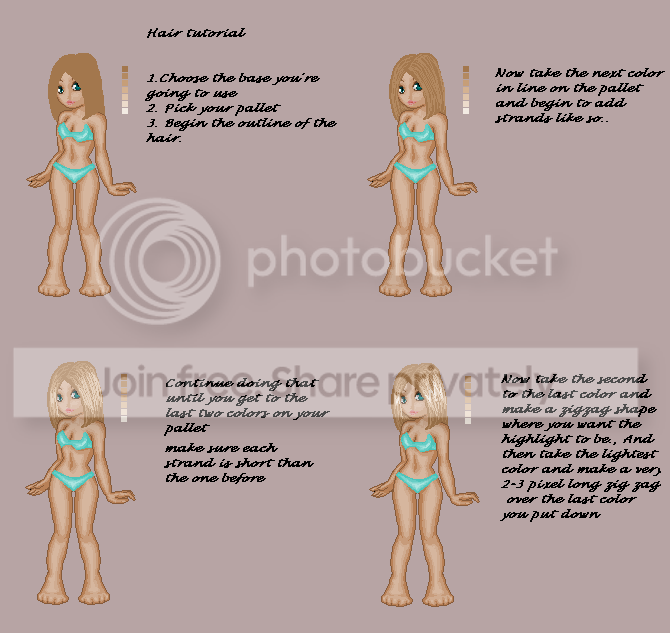
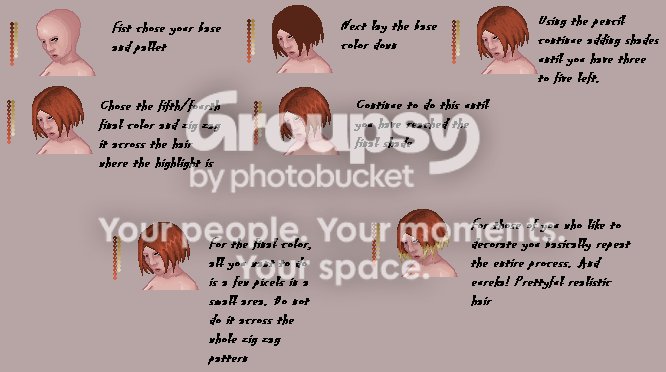
7.beginers hair


10. denium

[ANYONE capable of denium can take this.]

9.improving your hair

Tutourial needed.
[Rosakaylin will take this if no one claims it.]
8.improving your clothes

[Claimed by Rosakaylin*]
[*Rosakaylin is outside the guild, she is my older sister.]
9]

Gag Me With A Pixel
Crew


kendi64

PostPosted: Tue Jan 31, 2006 2:36 pm


Can you add my site in the list of doll sites?
User Image - Blocked by "Display Image" Settings. Click to show. or User Image - Blocked by "Display Image" Settings. Click to show.

Feel free to look at my link page and add to the links already on this page. I like to keep alot of links to people that have bases on their site, so I ended up having alot of them smile
PostPosted: Sat Aug 19, 2006 12:16 pm


can you add my site to the list too??

here it is:
User Image

my site www.geocities.com/snowdollies

benedikte

Reply
Pixel Post

 
Manage Your Items
Other Stuff
Get GCash
Offers
Get Items
More Items
Where Everyone Hangs Out
Other Community Areas
Virtual Spaces
Fun Stuff
Gaia's Games
Mini-Games
Play with GCash
Play with Platinum
//
//

// //

Have an account? Login Now!

//
//