
Welcome to Gaia! ::

The Artist's Block

Back to Guilds

For artists of all skill levels that want to improve and help others 

Tags: improve, critique, help, friendly, feedback 

Reply Artwork
[Critique Me] Prob12 (New)

Quick Reply

Enter both words below, separated by a space:

Can't read the text? Click here

Submit

prob12

Versatile Noob

7,500 Points
  • Person of Interest 200
  • Generous 100
  • Flatterer 200
PostPosted: Tue Nov 25, 2014 7:37 am


Hello guildmates blaugh
I want to apologize beforehand because I will probably be spamming smileys like i usually do.

Again nice to meet you guildmates and critiques/teachers blaugh . I'll keep this short (I was typing a wall of text awhile ago and deleted it cause even I wouldnt read it xp ) my art style is anime but my skills in coloring is close to 0.

So Ive been trying a new coloring style this past few days and I quite like the semi-realistic style since i can make my anime chars be kinda realistic.

Im hoping to get alot of hard critiques (If you please xp ) ones that can help me on my way to becoming a better artist emotion_kirakira

My goals are... in the other thread emotion_c8

Here is a sample of what my art looks like.
User Image

Is there a way to scale it down in gaia? D:.

Here is what im trying to do well at the moment.
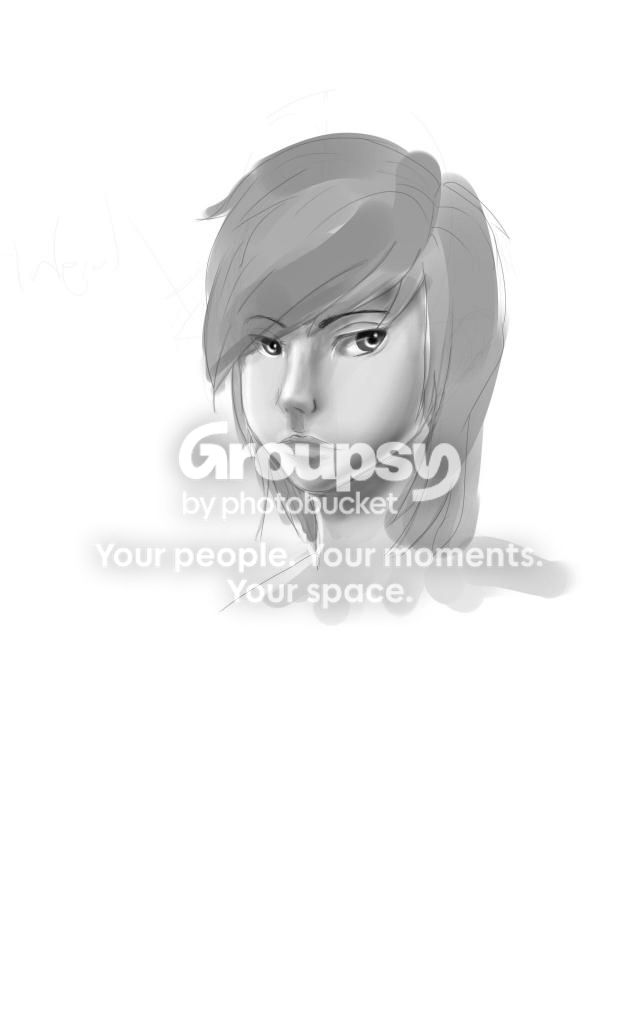
User Image


Note that the WIP one is like my 4th-5th try at this style and I am too ashamed to show the others as this is the most acceptable one. emotion_facepalm
PostPosted: Tue Nov 25, 2014 1:59 pm


Ello, Jem. ( You can't shrink images on Gaia sadly. You'll have to shrink them down in Sai or use save for webs in Photoshop if you have it )
I'm here to attempt to critique your semi-realism painting try.
The face is either too low or you made the head too large.
It's best to understand the planes of the face when it comes to painting more realistically. I tried to stick to your general lighting and not change too much of your style. I did a quick redline of some anatomy where I focused on the positioning of the mouth plane.I did a quick paintover. I'm not so good at explaining things so if you have any questions, please ask. xD
User Image - Blocked by "Display Image" Settings. Click to show.

hyceate

Vanquished Star


prob12

Versatile Noob

7,500 Points
  • Person of Interest 200
  • Generous 100
  • Flatterer 200
PostPosted: Tue Nov 25, 2014 4:21 pm


Jushiji
Ello, Jem. ( You can't shrink images on Gaia sadly. You'll have to shrink them down in Sai or use save for webs in Photoshop if you have it )
I'm here to attempt to critique your semi-realism painting try.
The face is either too low or you made the head too large.
It's best to understand the planes of the face when it comes to painting more realistically. I tried to stick to your general lighting and not change too much of your style. I did a quick redline of some anatomy where I focused on the positioning of the mouth plane.I did a quick paintover. I'm not so good at explaining things so if you have any questions, please ask. xD

User Image - Blocked by "Display Image" Settings. Click to show.


Thank you very much emotion_jawdrop the change you did is exactly what I wanted it to look like but couldnt crying
I was trying to add the cheekbone shadow but couldnt for some reason. It looked really odd when i tried it so this is verry helpful emotion_kirakira
Can I list the things i learned just for my reference. 3nodding
- Face plane
- Face anatomy
- Intensity of shadow (D: I was so scared of using darker shadows since it looked odd when i used it.)
-too much lighting?
- Nose hard lines? (I was trying to make a more realistic looking nose but it looked really big or fat when i tried it, so im guessing the leaves of the nose can be pointed if I wanted to make it look thinner?)

I'll keep this edited version in my reference folder xD as its a really good reference thank you very much for taking the time to critique me. emotion_kirakira

Edit: forgot to ask something xD were you using sai in editing this? if so what brush did you use for the shadow of the cheekbone and the eye socket thing. thanks again. yum_puddi
PostPosted: Tue Nov 25, 2014 10:28 pm


prob12

Thank you very much emotion_jawdrop the change you did is exactly what I wanted it to look like but couldnt crying
I was trying to add the cheekbone shadow but couldnt for some reason. It looked really odd when i tried it so this is verry helpful emotion_kirakira
Can I list the things i learned just for my reference. 3nodding
- Face plane
- Face anatomy
- Intensity of shadow (D: I was so scared of using darker shadows since it looked odd when i used it.)
-too much lighting?
- Nose hard lines? (I was trying to make a more realistic looking nose but it looked really big or fat when i tried it, so im guessing the leaves of the nose can be pointed if I wanted to make it look thinner?)

I'll keep this edited version in my reference folder xD as its a really good reference thank you very much for taking the time to critique me. emotion_kirakira

Edit: forgot to ask something xD were you using sai in editing this? if so what brush did you use for the shadow of the cheekbone and the eye socket thing. thanks again. yum_puddi


Noses are hard to draw in genera because of subconscious anime/manga cartoony style. I had a problem for a long time because I kept thinking in that style. Do you mean nostrils for leaves of the nose? xD
I did this in photoshop, but you can do this with airbrush with fuzystatic setting. Default airbrush is gross. And I use pen with fine flat.
An example with those two settings in paint tool sai.

User Image - Blocked by "Display Image" Settings. Click to show.

hyceate

Vanquished Star


prob12

Versatile Noob

7,500 Points
  • Person of Interest 200
  • Generous 100
  • Flatterer 200
PostPosted: Thu Nov 27, 2014 3:28 am


Jushiji
prob12

Thank you very much emotion_jawdrop the change you did is exactly what I wanted it to look like but couldnt crying
I was trying to add the cheekbone shadow but couldnt for some reason. It looked really odd when i tried it so this is verry helpful emotion_kirakira
Can I list the things i learned just for my reference. 3nodding
- Face plane
- Face anatomy
- Intensity of shadow (D: I was so scared of using darker shadows since it looked odd when i used it.)
-too much lighting?
- Nose hard lines? (I was trying to make a more realistic looking nose but it looked really big or fat when i tried it, so im guessing the leaves of the nose can be pointed if I wanted to make it look thinner?)

I'll keep this edited version in my reference folder xD as its a really good reference thank you very much for taking the time to critique me. emotion_kirakira

Edit: forgot to ask something xD were you using sai in editing this? if so what brush did you use for the shadow of the cheekbone and the eye socket thing. thanks again. yum_puddi


Noses are hard to draw in genera because of subconscious anime/manga cartoony style. I had a problem for a long time because I kept thinking in that style. Do you mean nostrils for leaves of the nose? xD
I did this in photoshop, but you can do this with airbrush with fuzystatic setting. Default airbrush is gross. And I use pen with fine flat.
An example with those two settings in paint tool sai.

User Image - Blocked by "Display Image" Settings. Click to show.


Very very helpful guide once again gaia_kittenstar thanks alot I wasnt tinkering around with those before since I didnt know what those were xD all I was using was the simple circle setting.

When I said leaves, I was talking about the the ( ) of the nose xD.

Thanks again for the critique and guidance emotion_kirakira
PostPosted: Thu Nov 27, 2014 4:32 am


prob12
Jushiji
prob12

Thank you very much emotion_jawdrop the change you did is exactly what I wanted it to look like but couldnt crying
I was trying to add the cheekbone shadow but couldnt for some reason. It looked really odd when i tried it so this is verry helpful emotion_kirakira
Can I list the things i learned just for my reference. 3nodding
- Face plane
- Face anatomy
- Intensity of shadow (D: I was so scared of using darker shadows since it looked odd when i used it.)
-too much lighting?
- Nose hard lines? (I was trying to make a more realistic looking nose but it looked really big or fat when i tried it, so im guessing the leaves of the nose can be pointed if I wanted to make it look thinner?)

I'll keep this edited version in my reference folder xD as its a really good reference thank you very much for taking the time to critique me. emotion_kirakira

Edit: forgot to ask something xD were you using sai in editing this? if so what brush did you use for the shadow of the cheekbone and the eye socket thing. thanks again. yum_puddi


Noses are hard to draw in genera because of subconscious anime/manga cartoony style. I had a problem for a long time because I kept thinking in that style. Do you mean nostrils for leaves of the nose? xD
I did this in photoshop, but you can do this with airbrush with fuzystatic setting. Default airbrush is gross. And I use pen with fine flat.
An example with those two settings in paint tool sai.

User Image - Blocked by "Display Image" Settings. Click to show.


Very very helpful guide once again gaia_kittenstar thanks alot I wasnt tinkering around with those before since I didnt know what those were xD all I was using was the simple circle setting.

When I said leaves, I was talking about the the ( ) of the nose xD.

Thanks again for the critique and guidance emotion_kirakira

No problem.
Paint Tool Sai is pretty sweet when it comes to textured strokes. I find the simple circle way too smooth for the more realistic style but perfect for simple rendering.

hyceate

Vanquished Star


prob12

Versatile Noob

7,500 Points
  • Person of Interest 200
  • Generous 100
  • Flatterer 200
PostPosted: Mon Dec 01, 2014 8:40 am


User Image


I tried adding darker shades and using the other brushes that jushiji informed me about. (although I blurred them)

Im abit satisfied by how I did this and am wondering if I should start moving on to coloring to get more acquainted to the coloring style that I want rather than practicing more values.

Although Im still far from the art style that I wish to achieve I have no idea how to improve it D: so Im wondering if colors would help.
PostPosted: Tue Dec 09, 2014 8:48 pm


It wouldn't matter if you added color to practice a painting style. If anything, it'll just add more frustration on trying to get colors to look right on top of trying to render. I would suggest more values and getting used to rendering first. Your image looks flat from the lack of in between values. *More grays*
Narrow nostrils does not make a narrow nose alone. Semi-realism usually pops in when there is a realistic nose and eyes. :p You can get away with narrow nostrils with a narrow nose bridge if the distance between the eyes and brows weren't so drastic. The eyes are literal spheres. Eye lids wrap around the ball. Here's something that I find explains it well. Reference Skulls aren't completely symmetrical either, so having slight differences on the other side of the face is perfectly fine. There are even people who have eyes with one higher than the other.

User Image - Blocked by "Display Image" Settings. Click to show.


Sorry I can't say much at the moment but I will be making a tutorial some time soon. . . Just I got finals to worry about. ^o^ Please be patient.

hyceate

Vanquished Star


prob12

Versatile Noob

7,500 Points
  • Person of Interest 200
  • Generous 100
  • Flatterer 200
PostPosted: Fri Dec 12, 2014 10:03 am


Jushiji

First I want to say thank you very much for the guidance emotion_kirakira these posts help alot and also I still can't believe how amazing it is after you fix it yum_puddi

Btw why are you apologizing xD you're doing me a favor by doing this a big one infact yum_puddi

I tried doing another one
User Image


It's not there yet, but I think its atleast better than what I did before emotion_kirakira the critiques you gave helped alot.

Hopefully I'll be able to do this well in a few weeks or months xD all your awesome works are making me want to rush towards getting better.

Thanks again and Good luck on your finals. emotion_kirakira
PostPosted: Fri Dec 12, 2014 6:31 pm


prob12
Jushiji

First I want to say thank you very much for the guidance emotion_kirakira these posts help alot and also I still can't believe how amazing it is after you fix it yum_puddi

Btw why are you apologizing xD you're doing me a favor by doing this a big one infact yum_puddi

I tried doing another one
User Image


It's not there yet, but I think its atleast better than what I did before emotion_kirakira the critiques you gave helped alot.

Hopefully I'll be able to do this well in a few weeks or months xD all your awesome works are making me want to rush towards getting better.

Thanks again and Good luck on your finals. emotion_kirakira


No problem ^o^
Yep this is a good attempt. biggrin You're improving quickly.
I'm hoping to see you try hair next. I love hair. You have no idea how much I love painting hair. HAIIIR. loljkjkjk

hyceate

Vanquished Star


HitokiriChibi
Captain

PostPosted: Fri Dec 19, 2014 7:14 pm


I've totally been meaning to post in here and say I'm loving where you are going with your style! It's a direction I'd love to take my own in so it's great to see you working at it and taking Jushiji's advice on board!

I can't really offer much myself - I think Jushiji covered everything, haha.
PostPosted: Mon Jan 05, 2015 8:21 pm


Jushiji

Happy new year emotion_kirakira How have you been.
Sorry I wasnt able to reply. I was so busy fixing the paperworks for the work im goin to do sweatdrop .

Definitely, I know the drawings of hair that I do is painful to look at xp I'll try to start back up on drawing once i finish the things i need to do. Hopefully that will be soon cause I might forget the things i've learned soon gonk

HitokiriChibi

Thanks emotion_kirakira and sorry for the really late reply.

Tbh the main reason i joined here is cause I saw alot of people going that direction so i'll probably be able to fit in. emotion_kirakira

I've actually been using all the references and different things available in the guild which were really helpful so i'll hopefully be able to put up a sketchbook soon too so that I can learn together with you guys emotion_kirakira

prob12

Versatile Noob

7,500 Points
  • Person of Interest 200
  • Generous 100
  • Flatterer 200

hyceate

Vanquished Star

PostPosted: Mon Jan 05, 2015 10:21 pm


prob12
Jushiji

Happy new year emotion_kirakira How have you been.
Sorry I wasnt able to reply. I was so busy fixing the paperworks for the work im goin to do sweatdrop .

Definitely, I know the drawings of hair that I do is painful to look at xp I'll try to start back up on drawing once i finish the things i need to do. Hopefully that will be soon cause I might forget the things i've learned soon gonk


Haappy New Year! Hope you had a merry Christmas too~
I've been fine. Trying out some manga style again for a challenge.
I'm sure everybody is pretty busy right now lul.
Good luck with your work smile
Reply
Artwork

 
Manage Your Items
Other Stuff
Get GCash
Offers
Get Items
More Items
Where Everyone Hangs Out
Other Community Areas
Virtual Spaces
Fun Stuff
Gaia's Games
Mini-Games
//
//

// //

Have an account? Login Now!

//
//