|
|
|
|
|
|
|

Beautiful x Mayhem Captain
|
 Posted: Sat Oct 13, 2012 5:43 pm Posted: Sat Oct 13, 2012 5:43 pm
|
|
|
|
|
|
|
|
|
|
Posted: Wed Oct 17, 2012 8:23 am
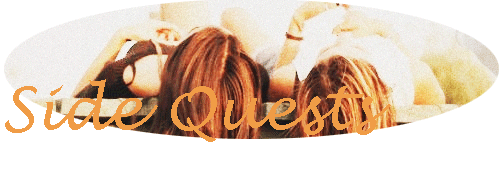
Too much orange. (also I should have looked at this before I posted in the other thread I guess, too late.)
Also - very basic, you could use layers to make a .gif. A gif - would be animated, and some programs like gimp do it based on layers. You could make the word flash colors, or the image flash colors (or other things). Try using gimp. It confused me at first, but then I've never really tried to teach myself gimp, good tool for .gifs though.
|
|
|
|
|
|
|
|
|
|
|
|
|
|
|
|
Beautiful x Mayhem Captain
|
Posted: Wed Oct 17, 2012 10:54 pm
shans Too much orange. (also I should have looked at this before I posted in the other thread I guess, too late.) Also - very basic, you could use layers to make a .gif. A gif - would be animated, and some programs like gimp do it based on layers. You could make the word flash colors, or the image flash colors (or other things). Try using gimp. It confused me at first, but then I've never really tried to teach myself gimp, good tool for .gifs though. Okay, thankyou for your feedback. I'll go have a look at using gimp.
|
|
|
|
|
|
|
|
|
|
|
|
|
|
|
Posted: Tue Mar 12, 2013 5:31 am
I dont know what you're using to manipulate images, but you should look into putting a thin dark outline around the text, just so that it doesnt blend into the background at the very least.
Using minimal colour schemes can work well, you just have to vary the saturation of the various objects in the scene. Saturation means the bold or blandness of a colour. Photoshop has a sponge tool that allows you to "de-saturate" (drain the colour from) an image to make it more subdued.
You may also consider slicing off the curve from the top and bottom 15% of the background oval shape, and either placing a border or some kind of shading or embossing to make it look a little less flat.
Edit: holy s**t this was a hell of a bump, my apologies.
|
|
|
|
|
|
|
|
|
|
|
|
|
|
|
|
Beautiful x Mayhem Captain
|
Posted: Thu Sep 19, 2013 10:42 pm
I'm not very good with technology as you can all see smile
|
|
|
|
|
|
|
|
|
|
|
|
|
|
|
|
|
|















 Reply
Reply