Welcome to Gaia! ::

Anonymous Head Quarters [JOIN TODAY]

Back to Guilds

Anonymous Gift Giving Head Quarters 

Tags: Anonymous, Plan, Head Quarters, Gold, Gifts 

Reply Hopes Guide's
HW Guide #5: Towns

Quick Reply

Enter both words below, separated by a space:

Can't read the text? Click here

Submit

Soul Hope
Crew

PostPosted: Thu Jul 23, 2009 10:23 am


Hello

Today I'm going to show you the wonder that many call Towns...Not really a wonder, but it is/was a fun part of Gaia. I'll explain later.

Now, to get to Towns you have to do this:

World>Towns
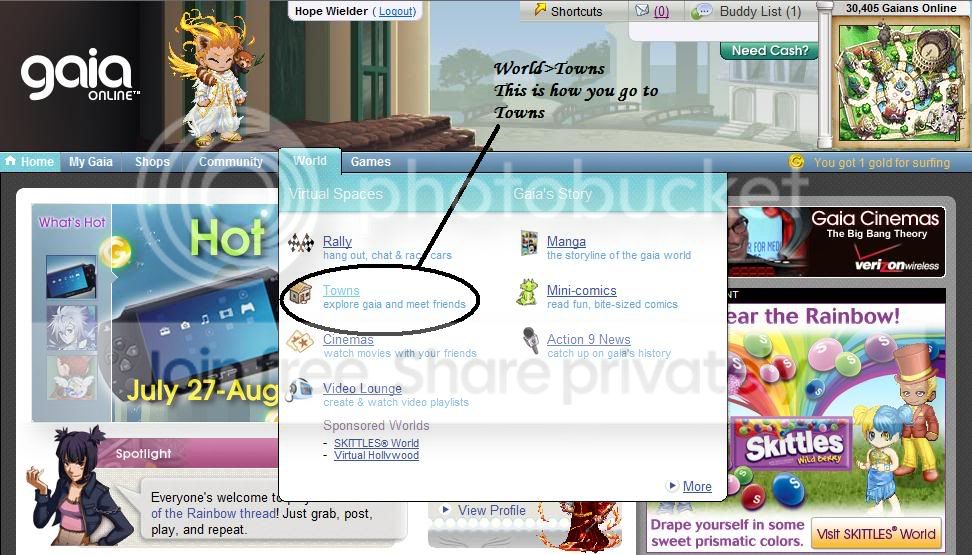
User Image

Now, click on Towns and you'll get a pop-up window. Wait for it to load.

That's Step one! Shall we move on? Yes, let's!

...Actually, that's the only step. Haha
The posts after this will explain the basic functions of Towns
PostPosted: Thu Jul 23, 2009 10:28 am


User Image

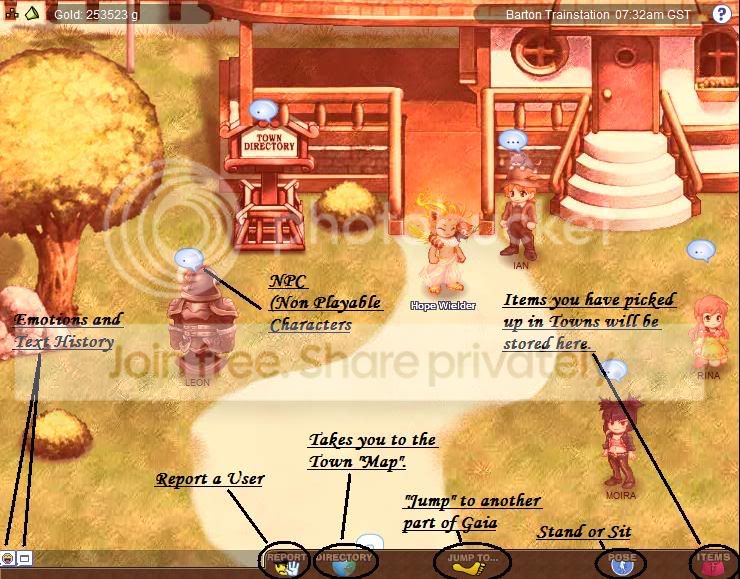
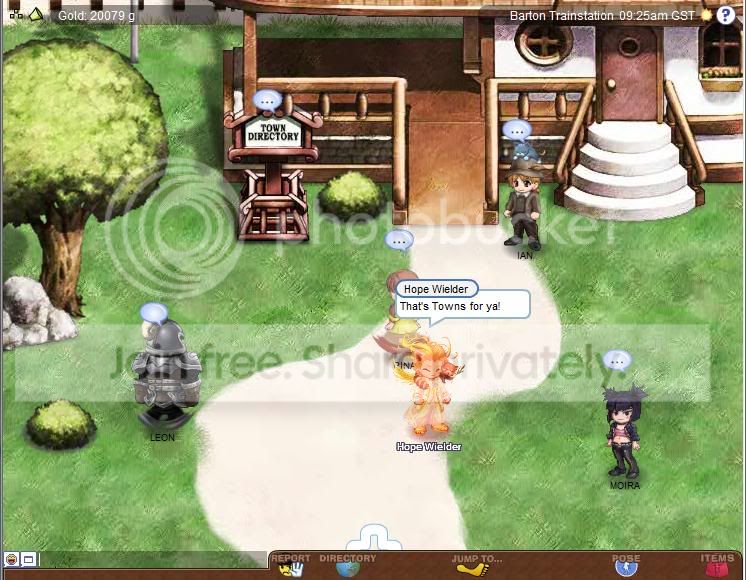
Now, that is what you'll see when you get to Towns.

I'll go into detail at what each button on the bottom does right away!

However, do you notice the NPC walking about? Talk to them by clicking on the bubble over their head. They'll also give you an
explanation on what you can do in Towns.

Let's move on.

Soul Hope
Crew


Soul Hope
Crew

PostPosted: Thu Jul 23, 2009 10:35 am


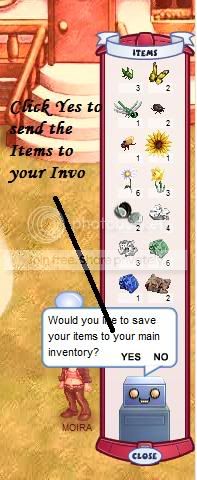
If you click on the button that says, "Items" this should pop-up!

User Image

These are the Items that you have found in Towns. No, they're not going to be Items that you can equip. They'll usually be Bugs, Paper, and Flowers. You can use these Items to make Ink, Hats, and Flower Bouquets!

You have to find the Items in Towns and click on them to get them.

After you find the Items, click on the button that says Items and then a robot should ask you if you want to send the items to your Main Invo. Click "Yes" and your all set.

That was easy, right?

Let's move on
PostPosted: Thu Jul 23, 2009 10:42 am


User Image

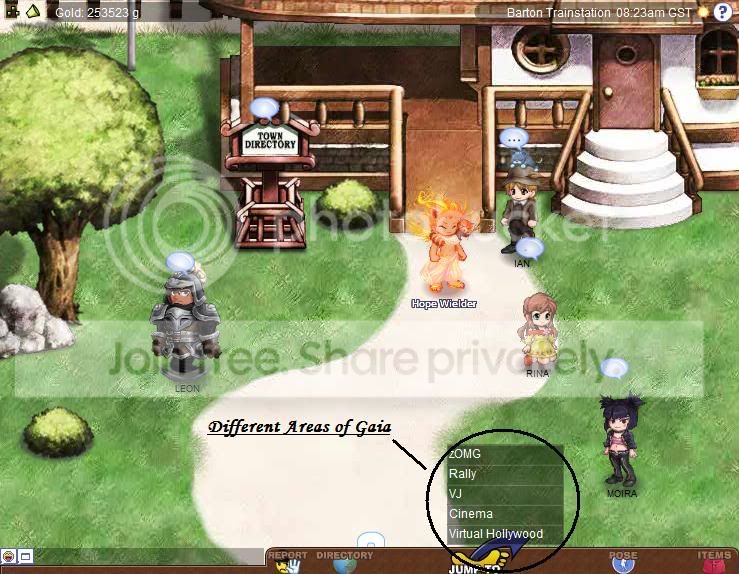
Click on the "Jump To..." button and a menu should appear.

It gives you a list of what areas you can go to. Click on them to go there right away.

Now, I usually don't go to those areas, but I'll make a Guide for them as well and I'll add links to them on this Post.

Here is a bit of Info that I do know, though:

zOMG: Gaias MMO! It's an amazing game that gives you a whole new look on the world of Gaia! Use Rings to defeat monsters and level up while talking to new and old NPC while doing quests and getting Gold.
Rally: Rally could easily be called Towns' Brother. It's basically the same thing except that you can race in Rally.
VJ: You can watch anything here. Basically, Gaia's Youtube!
Cinema: Sit around and watch movies with your friends!
Virtual Hollywood: Basically Towns, but Hollywood style!

As I said before, I'll add Links to these areas soon.

Let's move on!

Soul Hope
Crew


Soul Hope
Crew

PostPosted: Thu Jul 23, 2009 10:46 am


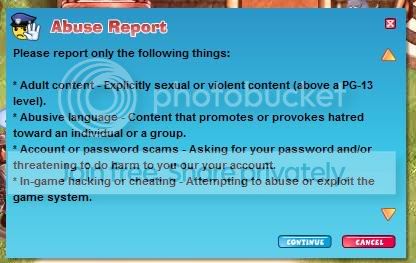
Click on the "Report" button and this should come up:

User Image

These are the reasons you can report users for.

If you are 100% that you want to report a user, go ahead and click continue.

From there on, fill out the form and send it in.

Make sure you are 100% sure though. Falsely reporting someone could get you in trouble.
PostPosted: Thu Jul 23, 2009 10:51 am


User Image
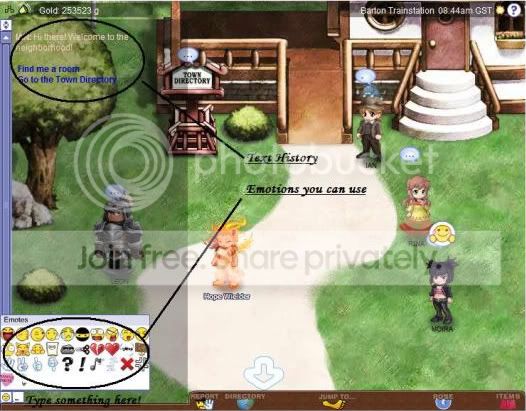
On the bottom-left corner of the page, you should see these little icons.

Click on the face and a box full of emotes shall pop up! Clicking on them will make a mood bubble appear above your Avatar showing that emote!

Click on the white Box and the text History will appear. This basically shows all the stuff that people have typed.

To the right of that, you can type something in that box. Once done, click Enter and you'll see a text box appear above your Avatar's head
displaying what you just typed.

That's it! Let's move on!

Soul Hope
Crew


Soul Hope
Crew

PostPosted: Thu Jul 23, 2009 10:57 am


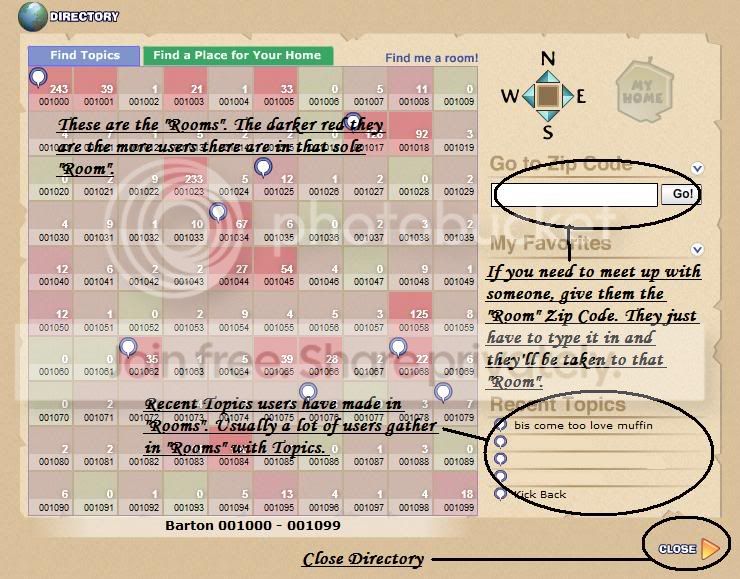
Now, for the last one. Click on Directory and this window should pop up!

User Image

This is the "Town Map". Click on the boxes on the left and you'll be taken to that "room".

The darker the box is, the more users there are.

Recent Topics are the most recent Topics that users make within a "Room". Usually, it's filled up, but I had to censor some out.
That's Towns for you, actually. You'll find a lot of, "Come get some SEX here!!!" Topics being made.

If you want to meet up with someone, get the Zip Code of the "Room" and put it in the Zip Code Box. You'll be taken to the Room right away.

Click on close to leave the Directory!
PostPosted: Thu Jul 23, 2009 10:58 am


User Image

That's Towns for you! Till next time, enjoy Gaia.

Soul Hope
Crew


Soul Hope
Crew

PostPosted: Mon Aug 17, 2009 12:57 am


A WARNING

One thing you should watch out for when you're in Towns is a Scriptor.
Scriptors mess with the Towns Data in a way
that allows them to do anything with them.

They can direct you to another page, make eggs and UFOs fly across the screen or even duplicate themselves.

However, the most dangerous thing that they can possibly do is steal you password.
There are stories out there of Users getting hacked due to a Scriptor.

If you're going to Towns, please do be careful.
Reply
Hopes Guide's

 
Manage Your Items
Other Stuff
Get GCash
Offers
Get Items
More Items
Where Everyone Hangs Out
Other Community Areas
Virtual Spaces
Fun Stuff
Gaia's Games
Mini-Games
Play with GCash
Play with Platinum
//
//

// //

Have an account? Login Now!

//
//