



There's a reason this is the first How to Guide.
This is the easiest thing that you ever have to do on Gaia or should I say, "This is the easiest thing you have to do to get on Gaia".
I'm going to assume that you know how to open your Web Browser and how to type in a Web Adress, right?
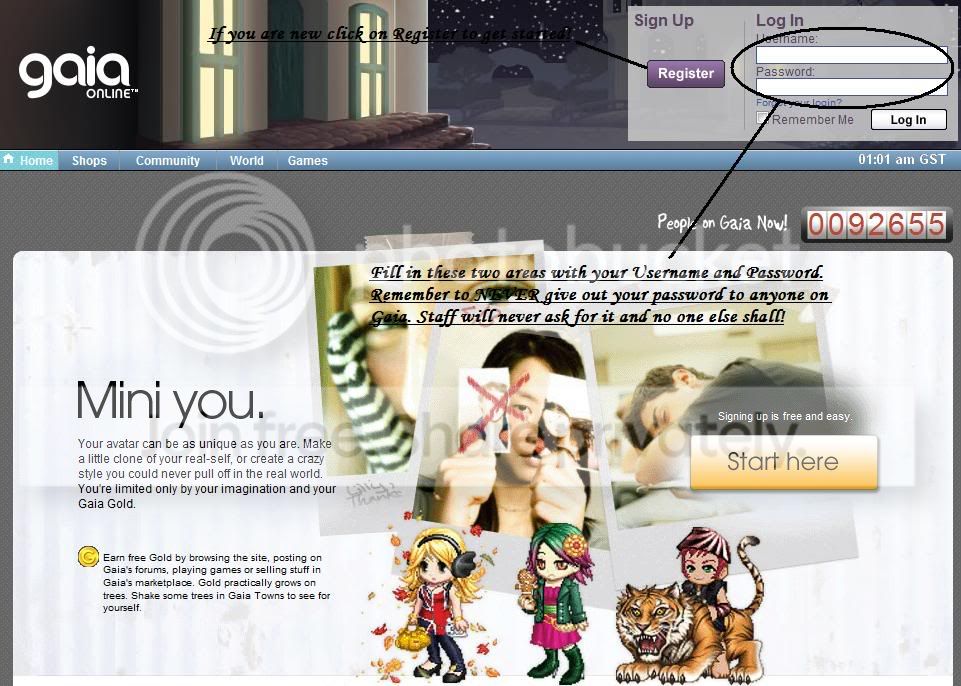
Well, type in Gaiaonline and you should be taken to a page that looks like the picture above.
Note: The Log In Page often changes. Just look at the Web Url, if it says Gaiaonline, you're good. Oh, and it's ".com" not ".org" or ".gov" or any other weird ending that you can come up with.
Alright, look at the picture. You should get the hang of it from this point on. Just type in your Username and Password if you've already Registered. If you have not, then click on the button that says, "Start Here" or the one that says "Register".
There's one thing that I have to mention because it is amazingly important.
DON'T EVER GIVE OUT YOUR PASSWORD TO ANYONE!!!
Please notice how I wrote that in big,red letters. Please do not give out your password to anyone. That's right. Anyone.
It doesn't matter who it is. You and only you should know your password.
"But I got a PM from an Admin/Mod saying that if I don't give them my password, they'll ban me."
NO! Guess what, Mods can't and shouldn't ask for your password. Guess what, Mods and Admins will NEVER ask for your password. Admins already have it. If they wanted to get into your Account, they would have done so a long time ago.
If a User asks for your Password, REPORT THEM!
Now that that's over with, let's move on to Step 2, shall we.