|
|
|
|
|
|
|
 Posted: Sun Jul 05, 2009 7:16 pm Posted: Sun Jul 05, 2009 7:16 pm

If you are supper excited about something you have just started on post it here.
Show it off even though its not done!
|
 |
|
|
|
|
|
|
|
|
|
|
|
|
|
Posted: Tue Jul 07, 2009 3:19 am
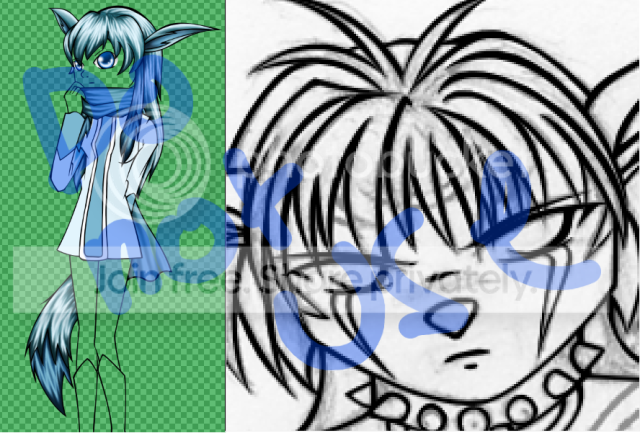 these are a few commissions that i've started and am trying to finish. ignore the green one. i like the black and white one. 3nodding
|
|
|
|
|
|
|
|
|
|
|
|
|
|
|
|
|
|
Posted: Tue Jul 07, 2009 7:34 am
Those are awesome!!! I love the fur on the green one even though I was supposed to ignore it xd I love the eyes on the black and white one!!!
|
|
|
|
|
|
|
|
|
|
|
|
|
|
|
Posted: Wed Jul 08, 2009 1:26 am
What program/technique do you use for your lines? I'm more of a digital painter so I always have difficulty making them look straight, but those look lovely smile
|
|
|
|
|
|
|
|
|
|
|
|
|
|
|
|
|
|
Posted: Wed Jul 08, 2009 10:29 am
I sketch out my pic and then scan it onto my gimp program. Then adjust the contrast from there.
|
|
|
|
|
|
|
|
|
|
|
|
|
|
|
Posted: Wed Jul 08, 2009 10:57 pm
First I sketch out my line work with a mechanical pencil, then ink it with a pen ('cause pencil's too light for my scanner stare ) then I use GIMP's Path Tool to ink it on another layer so I have my line art on the top layer. Lots of work. 3nodding
|
|
|
|
|
|
|
|
|
|
|
|
|
|
|
|
|
|
Posted: Thu Jul 09, 2009 11:45 am
Draconia23 First I sketch out my line work with a mechanical pencil, then ink it with a pen ('cause pencil's too light for my scanner stare ) then I use GIMP's Path Tool to ink it on another layer so I have my line art on the top layer. Lots of work. 3nodding
Do you like using the path tool the best? I just always use the color levels to make the black darker and the white brighter. Ive never used the path tool. I just use the fast and easy way but there is white around the edge on some sports that show up after I use the bucket fill.
|
|
|
|
|
|
|
|
|
|
|
|
|
|
|
Posted: Thu Jul 09, 2009 4:50 pm
Sallestia Draconia23 First I sketch out my line work with a mechanical pencil, then ink it with a pen ('cause pencil's too light for my scanner stare ) then I use GIMP's Path Tool to ink it on another layer so I have my line art on the top layer. Lots of work. 3nodding Do you like using the path tool the best? I just always use the color levels to make the black darker and the white brighter. Ive never used the path tool. I just use the fast and easy way but there is white around the edge on some sports that show up after I use the bucket fill.
Yeah I like using the path tool because it makes my lines cleaner. If I just use the image that I have now it would look messy, plus my pens tend to be a bit blotchy since I don't use art pens or stuff like that. And I also like having my line art on the very top layer so I don't have to switch all my other layers to Multiply or something like that.
|
|
|
|
|
|
|
|
|
|
|
|
|
|
|
|
|
|
Posted: Thu Jul 09, 2009 6:08 pm
Draconia23 Sallestia Draconia23 First I sketch out my line work with a mechanical pencil, then ink it with a pen ('cause pencil's too light for my scanner stare ) then I use GIMP's Path Tool to ink it on another layer so I have my line art on the top layer. Lots of work. 3nodding Do you like using the path tool the best? I just always use the color levels to make the black darker and the white brighter. Ive never used the path tool. I just use the fast and easy way but there is white around the edge on some sports that show up after I use the bucket fill.
Yeah I like using the path tool because it makes my lines cleaner. If I just use the image that I have now it would look messy, plus my pens tend to be a bit blotchy since I don't use art pens or stuff like that. And I also like having my line art on the very top layer so I don't have to switch all my other layers to Multiply or something like that.
When my pen blotches I just get the paint brush or eraser and get rid of the blob xD im making it way to difficult for myself. Ill try using the path tool from now on. Thanx btw
|
|
|
|
|
|
|
|
|
|
|
|
|
|
|
Posted: Thu Jul 09, 2009 8:09 pm
I have a WIP but I need help with it! D: I can't seem to get the light source right! I'd like some help with the shadows on the shirt. =3
|
|
|
|
|
|
|
|
|
|
|
|
|
|
|
|
|
|
Posted: Thu Jul 09, 2009 8:17 pm
Sallestia Draconia23 Sallestia Draconia23 First I sketch out my line work with a mechanical pencil, then ink it with a pen ('cause pencil's too light for my scanner stare ) then I use GIMP's Path Tool to ink it on another layer so I have my line art on the top layer. Lots of work. 3nodding Do you like using the path tool the best? I just always use the color levels to make the black darker and the white brighter. Ive never used the path tool. I just use the fast and easy way but there is white around the edge on some sports that show up after I use the bucket fill.
Yeah I like using the path tool because it makes my lines cleaner. If I just use the image that I have now it would look messy, plus my pens tend to be a bit blotchy since I don't use art pens or stuff like that. And I also like having my line art on the very top layer so I don't have to switch all my other layers to Multiply or something like that.
When my pen blotches I just get the paint brush or eraser and get rid of the blob xD im making it way to difficult for myself. Ill try using the path tool from now on. Thanx btw
I don't know how I helped, but your welcome. ^^ @Belladona: Wow, your WIP looks great! I also have trouble with folds in the clothes so I don't know how to help...sorry. sad
|
|
|
|
|
|
|
|
|
|
|
|
|
|
|
Posted: Fri Jul 10, 2009 10:23 am
Thanks, it's not folds I need help with, it's the lighting. I want to make sure the shadows make sense in the direction the light is coming from.
|
|
|
|
|
|
|
|
|
|
|
|
|
|
|
|
|
|
Posted: Fri Jul 10, 2009 11:21 am
To me so far the light source looks right. Maybe add a lil more shadow to his right armpit. If that is understandable. xd
|
|
|
|
|
|
|
|
|
|
|
|
|
|
|
Posted: Sat Jul 11, 2009 11:53 am
I haven't started that part yet. xd
I'm a bit concerned about the other side of his body though. Do those shadows make sense? (I'm horrible with light sourcing)
|
|
|
|
|
|
|
|
|
|
|
|
|
|
|
|
|
|
Posted: Sat Jul 11, 2009 2:49 pm
|
|
|
|
|
|
|
|
|



 Reply
Reply