|
|
|
|
|
|
|
|
|
 Posted: Thu Feb 19, 2009 9:33 pm Posted: Thu Feb 19, 2009 9:33 pm
Heroes can sneak into the well-guarded lairs of criminal masterminds, infiltrate alien computer systems, and create devices beyond the understanding of modern science. They can piece together clues to a villain’s latest plot, run along tightropes, and pilot vehicles through obstacle courses. They do so through the use of various skills, described in this thread.
Skill Basics
Skills are learned abilities acquired through a combination of training (the skill) and natural talent (an ability score). Each skill has a rank, used as a bonus to the die roll when using the skill. To use a skill roll:
d20 + skill rank + ability modifier + miscellaneous modifiers
The higher the roll, the better the result. You’re usually looking for a total that equals or exceeds a particular Difficulty Class (DC) or another character’s check total.
• Skill Rank: Your rank in a skill is based on the number of points you have invested in skills. If you have ranks in a skill you’re considered trained in that skill. You can use some skills even if you don’t have any ranks in them, known as using a skill untrained.
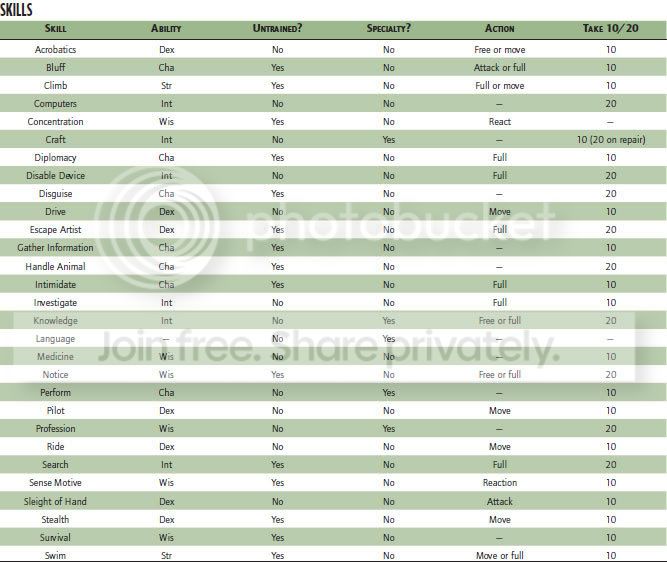
• Ability Modifier: Each skill has a key ability, the ability modifier applied to the skill’s checks. Each skill’s key ability is noted in its description and on the Skills table.
• Miscellaneous Modifiers: Miscellaneous modifiers to skill checks include situational modifiers for favorable or unfavorable conditions, bonuses from feats or powers, or penalties for not having proper tools, among others.
---Acquiring Skills
Characters gain skill ranks by spending power points: 4 skill ranks per power point. Skill ranks do not all need to be assigned to the same skill. Characters can perform some tasks without any training, using only raw talent (as defined by their ability scores), but skilled characters are better at such things. Characters with the right skills and feats can even hold their own against super-powered opponents.
Skill Cost = 1 power point per 4 skill ranks.
|
 |
|
|
|
|
|
|
|
|
|
|
|
|
|
Posted: Thu Feb 19, 2009 9:38 pm
How Skills Work
When you use a skill, make a skill check to see how you do. Based on the circumstances, your result must match or beat a particular number to use the skill successfully. The harder the task, the higher the number you need to roll. (See Checks for more information.)
---Untrained Skill Checks
Generally, if you attempt a task requiring a skill you don’t have, you make a skill check as normal. Your skill modifier doesn’t have a skill rank added in because you don’t have any ranks in the skill. You do get other modifiers, though, such as the ability modifier for the skill’s key ability.
Many skills can only be used if you are trained in the skill. Skills that cannot be used untrained are marked with a “No” in the “Untrained” column on the Skills table and listed as “Trained Only” in their descriptions.
Attempts to use these skills untrained automatically fail.
---Interaction Skills
Certain skills, called interaction skills, are aimed at dealing with others through social interaction. Interaction skills allow you to influence the attitudes of others and get them to cooperate with you in one way or another.
Since interaction skills are intended for dealing with others socially, they have certain requirements. First, you must be able to interact with the subjects of the skill. The subjects must be aware of you and able to understand you. If you don’t speak the same language, or they can’t hear you for some reason, that’s the same as working without the proper tools, a –4 on your skill check. Interaction skills work best on intelligent subjects, ones with an Int score of 3 or better. You can use them on creatures with Int 1-2, but with a –8 penalty; they’re just too dumb to get the subtleties of your point. You can’t use interaction skills at all on subjects lacking one or more mental ability scores. (Try convincing a rock to be your friend—or to be afraid of you—sometime.) The Immunity power can also render some characters immune to interaction skills.
You can use interaction skills on groups of subjects at once, but only to achieve the same result for all. So you can attempt to use Bluff or Diplomacy to convince a group of something, or Intimidate to cow a crowd, for example, but you can’t try to convince some individuals of one thing and the rest of another, or to intimidate some people and not others. Use common sense or ask a BM to decide if a particular use of an interaction skill is effective against a group, and may apply modifiers depending on the situation. The general rules for interaction still apply everyone in the group must be able to hear and understand you, for example, or you suffer a –4 on your skill check against them. Mindless subjects are unaffected.
---Manipulation Skills
Some skills, called manipulation skills, require a degree of fine physical
manipulation. You need prehensile limbs and a Strength score or some
suitable substitute (such as Precise Telekinesis) to use manipulation skills
effectively. Characters lacking the ability to use manipulation skills can
still have ranks in them and use them to oversee the work of others (granting
an aid bonus, for example, see Aid).
---Specialty Skills
Some skills cover a wide range of knowledge or techniques. These skills are actually groups of similar skills, called specialty skills. When putting ranks into one of these skills, you must choose a specialty, a particular aspect of the skill your character knows. For example, you might choose the physical sciences specialty of Knowledge or the mechanical specialty of Craft. Skill ranks in one specialty of a skill do not imply training in the skill’s other specialties.
|
|
|
|
|
|
|
|
|
|
|
|
|
|
|
|
|
|
Posted: Thu Feb 19, 2009 10:36 pm
Skill Descriptions
This section describes the skills available to characters, including their common uses and modifiers. Characters may be able to use skills for tasks other than those given here. A mod holding an event or a foe can set the DC. The format for skill descriptions is given here. Items that do not apply are omitted from the skill’s description.
Name Key Ability, Interaction, Manipulation, Speciality, Trained Only, Requires Tools
The skill name line contains the following information:
• Skill Name: What the skill is called. GMs may feel free to change the names of some skills to better suit the style of their game.
• Key Ability: The ability modifier applied to the skill check.
• Interaction: If “Interaction” is included next to the skill’s name, it is an interaction skill.
• Manipulation: If “Manipulation” is included next to the skill’s name, it is a manipulation skill.
• Specialty: If “Specialty” is included next to the skill’s name, you must choose a specialty for the skill.
• Trained Only: If “Trained Only” is next to the skill’s name, you must have at least 1 rank in the skill in order to use it. If “Trained Only” is absent, untrained characters (those with 0 ranks in the skill) may use it.
• Requires Tools: If “Requires Tools” is included next to the skill’s name, you need to have the proper tools to use the skill. Not having the proper tools results in a –4 penalty to the skill check.
The skill name line is followed by a brief description of the skill and four
other categories:
• Check: How to make a check for the skill, what the results are, and the basic Difficulty Class.
• Try Again: Conditions on retrying a check with the skill. If this section is omitted, the skill can be retried an unlimited number of times.
• Action: The type of action required to use the skill, how long it takes. As a general rule, if a skill takes a minute or longer to use, you can halve the time required by taking a –5 penalty on the check.
• Special: Any extra information about the skill or its use.
|
|
|
|
|
|
|
|
|
|
|
|
|
|
|
Posted: Thu Feb 19, 2009 10:51 pm
Acrobatics Dex, Trained Only
You can flip, dive, roll, tumble, and perform other acrobatic maneuvers, and you’re also adept at keeping your balance under difficult circumstances.
Check: Make an Acrobatics check (DC 25) to move through a space occupied by an opponent or obstacle (moving over, under, or around). A failed roll means you don’t get past the obstacle.
• Balancing: You can walk on a precarious surface. A successful check lets you move at half your speed along the surface as a move action. A failure indicates you spend your move action just keeping your balance and do not move. A failure by 5 or more means you fall. The difficulty varies with the conditions of the surface.
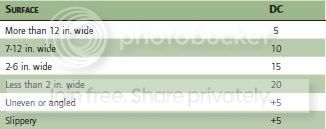
While balancing, you lose your dodge bonus to Defense unless you have 5 or more ranks in Acrobatics. If you take damage while balancing, make an immediate Acrobatics check to avoid falling.
• Accelerated Movement: You can try to move faster than normal while balancing. You can move your full speed, but take a –5 penalty on your Acrobatics check. Moving twice your speed requires two checks, one for each move action.
• Jumping: You can make an Acrobatics check to extend the distance you can jump by 1 foot per point your check exceeds DC 15.
• Falling: You can make an Acrobatics check (DC 5) to lessen damage from a fall. Subtract the amount your roll exceeds the DC from the distance of a fall in feet before determining damage. So an Acrobatics check of 20 (15 more than the DC) reduces the effective distance of a fall by 15 feet. A fall reduced to 0 distance does no damage and you land on your feet. You can reduce knockback damage in the same way (see Knockback).
• Avoiding Being Tripped: You can make an Acrobatics check in place of the Strength or Dexterity check to avoid a trip attack (see Trip). You cannot use Acrobatics to make trip attacks, however.
• Instant Up: You can make an Acrobatics check (DC 20) to stand from a prone position as a free action rather than a move action.
• Performance: You can use Acrobatics as a Perform skill to impress an audience.
Try Again: No.
Action: Free. If you actually move as part of your Acrobatics check, then it counts as part of your move action.
Special: The balancing aspects of Acrobatics can be used untrained.
|
|
|
|
|
|
|
|
|
|
|
|
|
|
|
|
|
|
Posted: Thu Feb 19, 2009 11:03 pm
Bluff Cha, Interaction
Bluff is the skill of making the outlandish seem credible. It covers acting, fast-talk, trickery, and subterfuge.
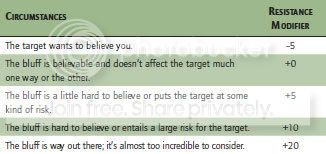
Check: A Bluff check is opposed by the target’s Bluff or Sense Motive check when trying to con or mislead. Favorable and unfavorable circumstances weigh heavily on the outcome of a bluff. Two circumstances can work against you: the bluff is hard to believe, or the action the bluff requires goes against the target’s self-interest, nature, personality, orders, or allegiance. If it’s important, a BM during an event can distinguish between a bluff that fails because the target doesn’t believe it and one that fails because it asks too much. For instance, if the target gets a +10 bonus because the bluff demands something risky, and the Sense Motive check succeeds by 10 or less, then the target didn’t so much see through the bluff as prove reluctant to go along with it. If the target’s Sense Motive check succeeds by 11 or more, he has seen through the bluff, and would have succeeded even if it had not placed unusual demand on him (that is, even without the +10 bonus). A successful Bluff check indicates the target reacts as you want, at least for a short time (usually 1 round or less), or believes what you say.
• Diversion: You can use Bluff to help you hide. A successful Bluff check gives you the momentary diversion needed to attempt a Stealth check while people are aware of you (see Stealth).
• Feint: You can use Bluff to mislead an opponent in combat so he can’t avoid your attacks as effectively. If your Bluff check succeeds, the next attack you make against the target is considered a surprise attack.
• Innuendo: You can use Bluff to send secret messages while apparently talking about other things. The DC for a basic message is 10. Complex messages or messages trying to communicate new information have DCs of 15 or 20, respectively. The recipient of the message must make a Sense Motive check against the same DC to understand it. Anyone listening in on a secret message can also attempt a Sense Motive check. If successful, the eavesdropper realizes a secret message is contained in the communication. If the eavesdropper beats the DC by 5 or more, he understands the secret message. Whether trying to send or pick up a message, a failure by 5 or more means the receiver misinterprets the message in some fashion.
• Trick: You can use Bluff to mislead an opponent into taking a potentially unwise action, such as trying to hit you while you are standing in front of an electrical junction box or at the edge of a precipice. If your Bluff check succeeds, your opponent is heedless of the potential danger and may hit the junction box or lose his balance and fall, if his attack against you fails. (On the other hand, if the attack succeeds, it might slam you into the junction box or send you flying off the edge.)
Try Again: Generally, a failed Bluff check makes the target too suspicious for you to try again under the same circumstances. When feinting or tricking in combat, you can try again freely, but targets get a cumulative +1 bonus to resist each time you try to bluff them in combat after the first.
Action: A bluff normally takes at least a full round but can take longer if you try something elaborate. Using Bluff to feint or trick in combat is a standard action, as is using Bluff to create a diversion to hide. You can feint, trick, or create a diversion as a move action by taking a –5 penalty on your check.
|
|
|
|
|
|
|
|
|
|
|
|
|
|
|
Posted: Thu Feb 19, 2009 11:09 pm
Climb Str
You’re skilled in scaling angled and uneven surfaces.
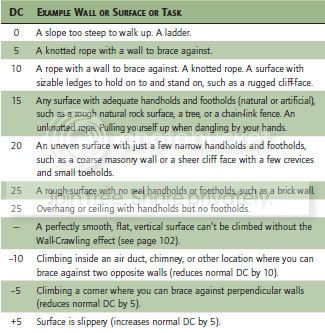
Check: With each successful Climb check, you can move up, down, or across a slope, wall, or other steep incline (even a ceiling with handholds). A slope is any incline of less than 60 degrees; a wall is any incline of 60 degrees or steeper.
A failed Climb check indicates you make no progress, and failure by 5 or more means you fall from whatever height you already attained (unless you are secured with some kind of harness or other equipment). Make a Climb check to catch yourself (DC equal to wall’s DC + 20). A slope is easier to catch on (DC equal to slope’s DC + 10). It’s somewhat easier to catch someone else who falls, assuming they are within arm’s reach. Make a Climb check (DC equal to wall’s DC +10) to do so. A slope is easier (DC equal to the slope’s DC +5). If you fail the check, you do not catch the other person. If you fail by 5 or more, you fall as well. The DC of the check depends on the conditions of the climb. If the climb is less than 10 feet, reduce the DC by 5.
• Fighting While Climbing: Since you can’t easily move to avoid an attack, you lose your dodge bonus while climbing. Any time you take damage while climbing, make an immediate Climb check against the DC of the slope or wall. Failure means you fall and sustain the appropriate falling damage.
• Accelerated Movement: You can try to climb faster than normal. You can move your full speed, but take a –5 penalty on your Climb check. Moving twice your speed requires two checks at –5, one for each move action.
Action: Climbing one-half your speed is a full-round action. Moving half that fast (one-fourth your speed) is a move action. Accelerated climbing, allowing you to climb at full speed, is a full-round action. You can move half that far (one-half your speed) as a move action.
Special: At the GM’s discretion, certain kinds of climbing attempts might require tools like ropes, pitons, harness, and so forth. Attempting such a climb without tools incurs a –4 penalty.
|
|
|
|
|
|
|
|
|
|
|
|
|
|
|
|
|
|
Posted: Thu Feb 19, 2009 11:28 pm
Computers Int, Manipulation, Trained Only
You’re trained in the operation of computers and modifying or creating software.
Check: Most normal computer operations—using software, getting your e-mail—don’t require a Computers check and can be done untrained. However, searching an unfamiliar network for a particular file, writing programs, altering existing programs to perform differently, and breaking computer security all require skill checks (and training).
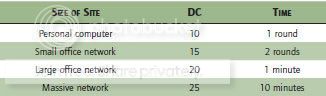
• Find File: The DC and the time required to locate a particular file on an unfamiliar computer system are determined by the size of the site. Finding public information on the Internet does not fall under this category; this only pertains to finding files on unfamiliar computer systems.
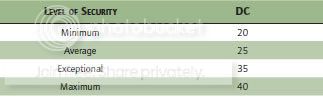
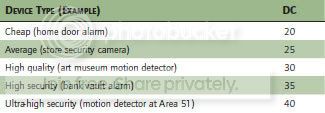
• Defeat Computer Security: The DC is determined by the quality of the security installed to defend the system. If the check fails by 5 or more, the system immediately alerts its administrator there has been an unauthorized entry. An alerted administrator may attempt to identify you or cut off access to the system.
Sometimes, you have to defeat security at more than one stage of the operation. If you beat the DC by 10 or more when attempting to defeat computer security, you automatically succeed at all subsequent security checks at that site until the end of your session.
• Defend Security: If you are the system administrator for a site (which may be as simple as being the owner of a personal computer), you can defend it against intruders. If the site alerts you to an intruder, you can attempt to cut off the intruder’s access or even to identify the intruder. To cut off access, make an opposed Computers check against the intruder. If the check succeeds, the intruder’s session is ended. The intruder might be able to defeat your security and access your site again, but has to start over again. Attempting to cut off access takes a full round.
One surefire way to prevent further access is to simply shut the site down. With a single computer, that’s no big deal, but on a large site with many computers (or computers controlling functions that can’t be interrupted) it may be time-consuming or even impossible to do so. To identify the intruder, make an opposed Computers check. If the check succeeds, you learn the site from which the intruder is operating (if it’s a single computer, you learn the name of the computer’s owner). Identifying the intruder requires 1 minute and is a separate check from cutting off access. This check can only be made if the intruder is accessing your site for the entire length of the check—if the intruder’s session ends before you make the Computers check, your attempt fails.
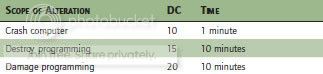
• Degrade Programming: You can destroy or alter programs on a computer to make it harder or impossible to use. Crashing a computer simply shuts it down. Its user can restart it without a skill check (however, restarting takes at least 1 minute). Destroying programming makes the computer unusable until the programming is repaired. Damaging programming imposes a –4 penalty on all checks made with the computer (sometimes this is preferable to destroying the programming, since the user might not know anything is wrong, and won’t simply decide to use a different computer).
You can damage the programming of multiple computers at a single site; doing so adds +2 to the DC for each additional computer.
Fixing damaged programming requires an hour and a Computers check against a DC equal to the DC for damaging it + 5. Destroyed programming must be re-installed.
• Write Program: You can create a program to help with a specific task. Doing so grants a +2 bonus to the task. A specific task, in this case, is one type of operation with one target. The DC to write a program is 20; the time required is one hour.
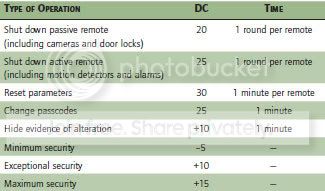
• Operate Remote Device: Many devices are computer-operated. If you have access to the computer controlling them, you can shut them off or change their operating parameters. The DC depends on the nature of the operation. If you fail the check by 5 or more, the system alerts its administrator there has been an unauthorized use of the equipment. An alerted administrator may attempt to identify you or cut off your access to the system.
Action: Computers requires at least a full-round action. The GM may determine some tasks require several rounds, a few minutes, or longer, as described above.
Special: You can take 10 when using the Computers skill. You can take 20 in some cases, but not those involving a penalty for failure. (You cannot take 20 to defeat computer security or defend security, for example.)
|
|
|
|
|
|
|
|
|
|
|
|
|
|
|
Posted: Thu Feb 19, 2009 11:38 pm
Concentration Wis
You can focus your mind and concentrate despite difficult conditions, including taking damage.
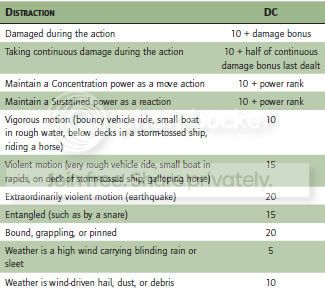
Check: Make a Concentration check whenever you might be distracted (by taking damage, by harsh weather, and so on) while engaged in some action requiring your full attention, maintaining powers with a Concentration or Sustained duration. If the check succeeds, you may continue with the action. If the check fails, the action fails. The DC depends on the nature of the distraction.
Try Again: Yes, although a success doesn’t cancel the effects of a previous failure, such as the disruption of an action you were concentrating on.
Action: Making a Concentration check doesn’t require an action; it is either a reaction (when attempted in response to a distraction) or a free action (when attempted actively).
|
|
|
|
|
|
|
|
|
|
|
|
|
|
|
|
|
|
Posted: Thu Feb 19, 2009 11:53 pm
Craft Int, Manipulation, Specialty, Trained Only, Requires Tools
Craft covers a number of skills for making things. The different Craft specialties are:
• Artistic: You can create works of visual art, such as drawings, paintings, sculptures, and so forth.
• Chemical: You can mix chemicals to create acids, drugs, explosives, poisons, and so forth.
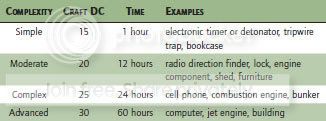
• Electronic: You can build electronic items.
• Mechanical: You can build mechanical items.
• Structural: You can build wooden, concrete, or metal structures including buildings and furniture.
Check: Craft skills are specifically focused on making things. To use Craft effectively, you must have an appropriate set of tools.
• Making Items: The difficulty and time required to make a particular item depends on its complexity. If your campaign uses the optional rules for Wealth and Purchasing Equipment, you will have to make a Wealth Check with a Difficulty Class 10 less than the Craft DC to acquire the necessary materials (see Wealth and Purchasing Equipment). If your Craft check succeeds, you have made the item. If the Craft check fails, you did not produce a usable end result, and any materials are wasted.
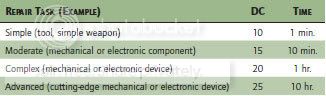
• Repairing Items: You can use the electronic, mechanical, and structural Craft skills to repair damaged items of the appropriate type. Most repair checks are made to fix electronic or mechanical devices. In general, simple repairs have a DC of 10 to 15 and require no more than a few minutes. More complex repair work has a DC of 20 or higher and can require an hour or more.
• Jury-Rigging: You can also attempt jury-rigged, or temporary, repairs. Doing this reduces the DC by 5 from that of a regular repair, and allows you to make the check as a full-round action. However, a jury-rigged repair can only fix a single problem, and the repair only lasts until the end of the current encounter. The jury-rigged item must be fully repaired thereafter, and cannot be jury-rigged again until it is fully repaired. You can also use jury-rigging to hot-wire a car or jump-start an engine or electronic device. The DC for this is at least 15, and can be higher depending on the presence of security devices.
• Demolitions: Characters can use Craft (chemical) to make explosives. Setting a simple explosive to blow up at a certain spot doesn’t require a check, but connecting and setting a detonator does. Also, placing an explosive for maximum effect against a structure calls for a check, as does disarming an explosive device.
Most explosives require a detonator to go off. Connecting a detonator to an explosive requires a Craft (mechanical) check (DC 10). Failure means the explosive fails to go off as planned. Failure by 10 or more means the explosive goes off as the detonator is being installed.
You can make an explosive more difficult to disarm. To do so, choose the disarm DC before making your check to set the detonator (it must be higher than 10). Your DC to set the detonator is equal to the disarm DC. Disarming an explosive requires a Craft (mechanical) or Disable Device check. The DC is usually 10, unless the person who set the detonator chose a higher disarm DC. If you fail the check, you do not
disarm the explosive. If you fail by 5 or more, the explosive goes off.
Setting or disarming a detonator is a full-round action.
Carefully placing an explosive against a fixed structure can maximize the damage by exploiting vulnerabilities in the construction. This requires at least a minute and a Craft (structural) check. A mod will make the check (so you don’t know exactly how well you have done until the explosive goes off). On a result of 15 or higher, the explosive deals +5 damage to the structure. On a result of 25 or higher, it deals +10 damage. In all cases, it deals normal damage to all other targets within its blast radius.
• Forgery: Characters can use Craft to produce forgeries of any item they can normally make. The result of the check becomes the DC for a Notice check to detect the forgery. The GM can modify either check based on the conditions and the characters’ familiarity with the original subject.
• Inventing: If you have the Inventor feat (see page 62), you can use Craft to build inventions, temporary devices. See Inventing for details.
Try Again: Yes, although in some cases the GM may decide a failed attempt to repair or jury-rig an item has a negative effect, preventing further attempts.
Action: The time to make something varies according on its complexity. The Gamemaster may increase or decrease the time for a particular Craft project as necessary. You can cut the time for making or repairing an item in half by taking a –5 penalty.
Special: You can take 10 when using a Craft skill, but can’t take 20 since doing so represents multiple attempts, and you use up raw materials with each attempt. You can take 10 or 20 on repair checks. If you don’t have the proper tools, you take a –4 penalty on Craft checks.
|
|
|
|
|
|
|
|
|
|
|
|
|
|
|
Posted: Fri Feb 20, 2009 12:02 am
Diplomacy Cha, Interaction
You’re skilled in dealing with people, from etiquette and social graces to a way with words and public speaking. Use this skill to make a good impression, negotiate, and win people over.
Check: You can change others’ attitudes with a successful Diplomacy check. In negotiations, all participants roll Diplomacy checks to see who gains the advantage. Opposed checks also resolve cases where two advocates plead opposing cases before a third party.
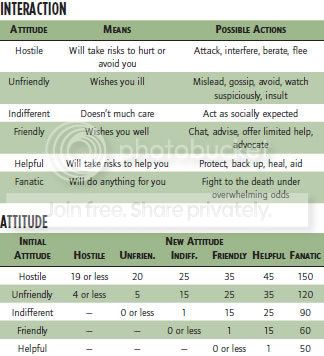
Diplomacy can influence an NPC’s attitude. The GM chooses the character’s initial attitude based on circumstances. Most of the time, people are friendly or indifferent toward heroes, but a specific situation may call for a different initial attitude. The DCs given on the Interaction table show what it takes to change someone’s attitude with a use of Diplomacy. You don’t declare a specific outcome; instead, make the check and compare the result to the Interaction table to see what you’ve accomplished. A low roll may actually worsen the subject’s attitude!
A fanatical NPC is willing to do anything the character wants. The fanatic state lasts for one day, plus a day per point of the character’s Charisma bonus. Fanatics can’t have their attitudes adjusted using interaction skills and have a +20 bonus to resist attempts to intimidate them.
Try Again: Generally, trying again doesn’t work. Even if the initial check succeeds, the other character can only be persuaded so far. If the initial check fails, the other character has probably become more firmly committed to his position, and trying again is futile. At the GM’s discretion, you can try again when the situation changes in some way: you find a new
approach to your argument, new evidence appears, and so forth.
Action: Diplomacy is at least a full-round action. The GM may determine some negotiations require longer (perhaps much longer).
|
|
|
|
|
|
|
|
|
|
|
|
|
|
|
|
|
|
Posted: Fri Feb 20, 2009 12:40 am
Disable Device Int, Manipulation, Trained Only, Requires Tools
You can disarm or sabotage various devices, both mechanical and electronic.
Check: Usually made during events, a mod running said event sets the DC. Or the DC is 15 + the devices rank.
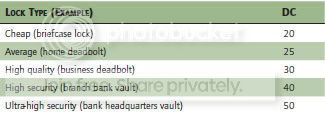
• Open Lock: You can pick conventional locks, finesse combination locks, and bypass electronic locks. You must have a lockpick set (for a mechanical lock) or an electronic tool kit (for an electronic lock). The DC depends on the quality of the lock.
• Disable Security Device: You can disable a security device, such as an electric fence, motion sensor, or security camera. You must be able to reach the actual device. If the device is monitored, your attempt to disable it will probably be noticed.
When disabling a monitored device, you can prevent your tampering from being noticed. Doing so requires 10 minutes and an electronics tool kit, and increases the DC by +10.
• Traps and Sabotage: Disabling a simple mechanical device is DC 10. More intricate and complex devices have higher DCs. You can use Disable Device to defuse explosives like the Craft (mechanical) skill. If the check succeeds, you disable the device. If the check fails by 4 or less, you have failed but can try again. If you fail by 5 or more, something goes wrong. If it’s a trap or explosive, you set it off. If it’s some sort of sabotage, you think the device is disabled, but it still works normally.
When you sabotage simple devices, you can rig them to work normally for a while and then fail some time later, if you choose.
• Disable Technology: You can disable any technological device with a DC 30 skill check. You can also disable technological creatures, like androids or robots, with the same check, but the subject must be helpless for you to make the check. Note this doesn't count on players or their minions but rather NPC's devices during events.
Try Again: Yes, though you must be aware you have failed in order to try again.
Action: Disabling a simple device is a full-round action. Intricate or complex devices require multiple rounds. Reducing a multi-round task to one round increases the DC by +20.
Special: You can take 10 when making a Disable Device check. You can take 20 to open a lock or disable a security device, unless you are trying to prevent your tampering from being noticed.
|
|
|
|
|
|
|
|
|
|
|
|
|
|
|
Posted: Fri Feb 20, 2009 7:58 am
Disguise Cha, Manipulation, Requires Tools
You can use makeup, costumes, and other props to change your appearance.
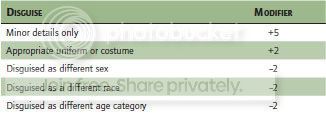
Check: Your check result determines the effectiveness of the disguise. It is opposed by others’ Notice check results. Make one Disguise check even if several people make Notice checks. If you don’t draw any attention to yourself, others don’t get to make Notice checks. If you come to the attention of people who are suspicious, they get to make a Notice check. The effectiveness of your disguise depends in part on how much you attempt to change your appearance.
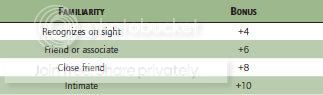
If you are impersonating a particular individual, those who know the subject automatically get to make Notice checks. Furthermore, they get a bonus on the check.
Usually, an individual makes a Notice check to detect a disguise immediately upon meeting you and each hour thereafter. If you casually meet many different people, each for a short time, the NPCs or enemy players check once per day or hour, using an average Notice modifier for the group (assuming they take 10). Successfully acting like who you appear to be may require a Bluff or Perform (acting) check with a DC equal to the observer’s Sense Motive check, modified by familiarity if the observer knows the subject well.
Try Again: No, though you can assume the same disguise again at a later time. If others saw through the previous disguise, they are automatically treated as suspicious if you assume the same disguise again.
Action: A Disguise check requires at least 10 minutes of preparation. The opponents who encounter you immediately upon meeting you and again each hour or day thereafter make Notice checks , depending on circumstances.
Special: You can take 10 or take 20 when assuming a disguise. If you don’t have a disguise kit you take a –4 penalty on Disguise checks. You can help someone else create a disguise, treating it as an aid attempt.
|
|
|
|
|
|
|
|
|
|
|
|
|
|
|
|
|
|
Posted: Fri Feb 20, 2009 8:18 am
Drive Dex, Manipulation, Trained Only
Use this skill to operate any ground or water vehicle.
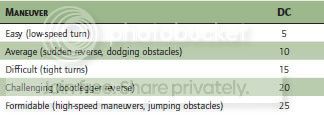
Check: Make a check only when some unusual circumstance exists or when driving in a dramatic situation (being chased or attacked, for example, or trying to reach a destination in a limited amount of time). While driving, you can attempt maneuvers or stunts.
Try Again: Most Drive checks have consequences for failure that make trying again impossible.
Action: A Drive check is a move action.
Special: Routine tasks, such as ordinary movement, don’t require a skill check and may be done untrained. At the Gamemaster’s option, Drive may require specialization, such as ground vehicles or water vehicles.
|
|
|
|
|
|
|
|
|
|
|
|
|
|
|
|
|
|