|
|
|
|
|
|
|

Memories key Vice Captain
|
 Posted: Tue Feb 17, 2009 1:58 pm Posted: Tue Feb 17, 2009 1:58 pm
Hey guys, how are you? Well today I decided to make a little computer guide for those who are having conflicts with their current OS and/or PC. Please, don't move this thread, lock it, or delete it. Well here we go, in the next few posts, I will post how to get rid of malware, adware, or spyware. Also, improve your PC's performance, overall.
PLEASE NOTICE, THESE ARE JUST FAIRLY EASY WAYS, NOTHING TOO COMPLEX, I'D RATHER NOT MAKE IT VERY COMPLEX AS IT CAN GET CONFUSING.
Please also notice I have permission from TGN, and agreed as long as this is Gaia appropriate and doesn't break the TOS I may post it in this forum.
|
|
|
|
|
|
|
|
|
|
|
|
|
|
|
Posted: Tue Feb 17, 2009 2:32 pm
CMDThis is your first choice if you don't have a decent anti-virus, or you need some simple computer tricks. I will show you some commands, and what they each do. Read on if you're interested. How to get to CMD (Command Prompt)
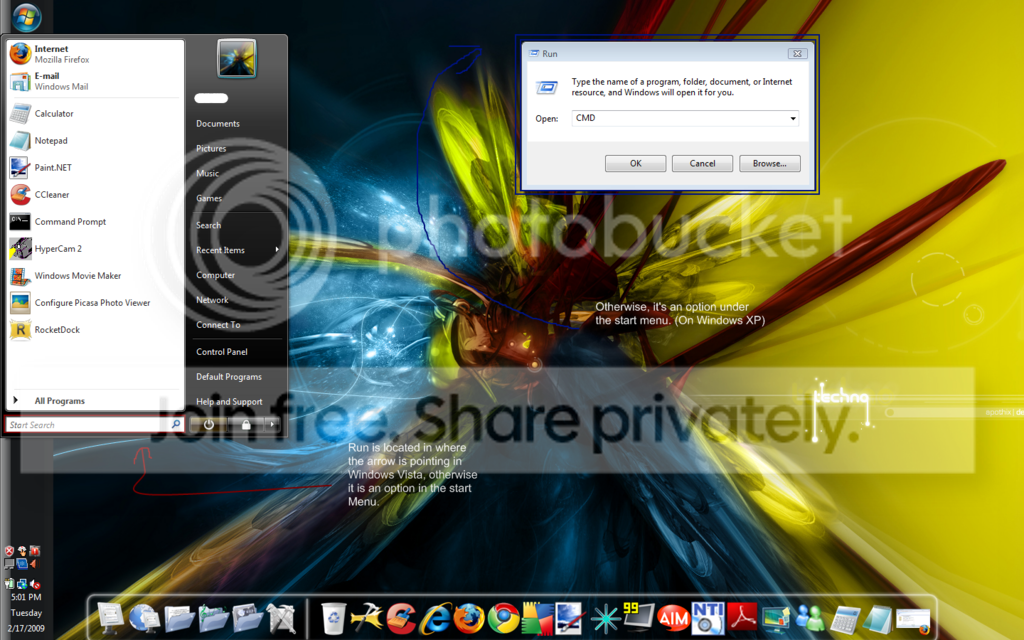
Now, for the second step. You should get a screen that is something like this:
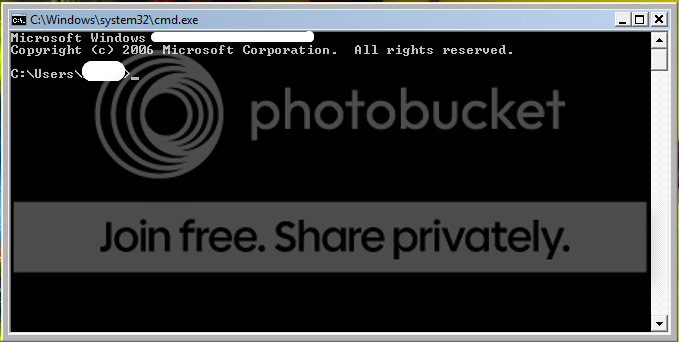
(One part was erase due to personal computer data)
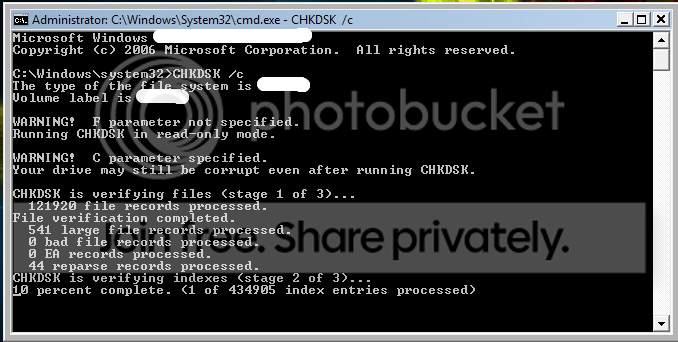
There are many options here, from here you may type: CHKDSK. Which checks a disk and identifies the status report. For example if I want to check my /C drive then I would do CHKDSK /C. This basically checks the partition of the disk and ensures that there are no obsolete keys, or disk fragmentation.
You will now get something like this: (Depending on what disk you are checking)
Other than that, there is nothing "easy" you can do on CMD to debug, or check your PC.
But, some useful tools are...
Ipconfig (This shows you your ip adress, subnet mask, network, and Ipv4.)
Exit (Exits command prompt)
Have you ever wanted to go to sleep, listen to your music, and charge your IPOD? Well this is a great solution, and it's manual. So this is guaranteed to work if implied right.
Okay, enter CMD again. But now do the following.
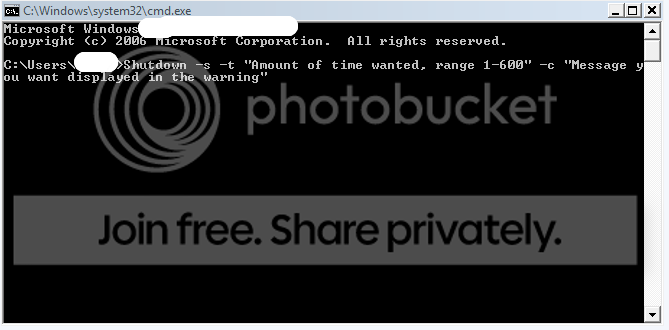
For example,
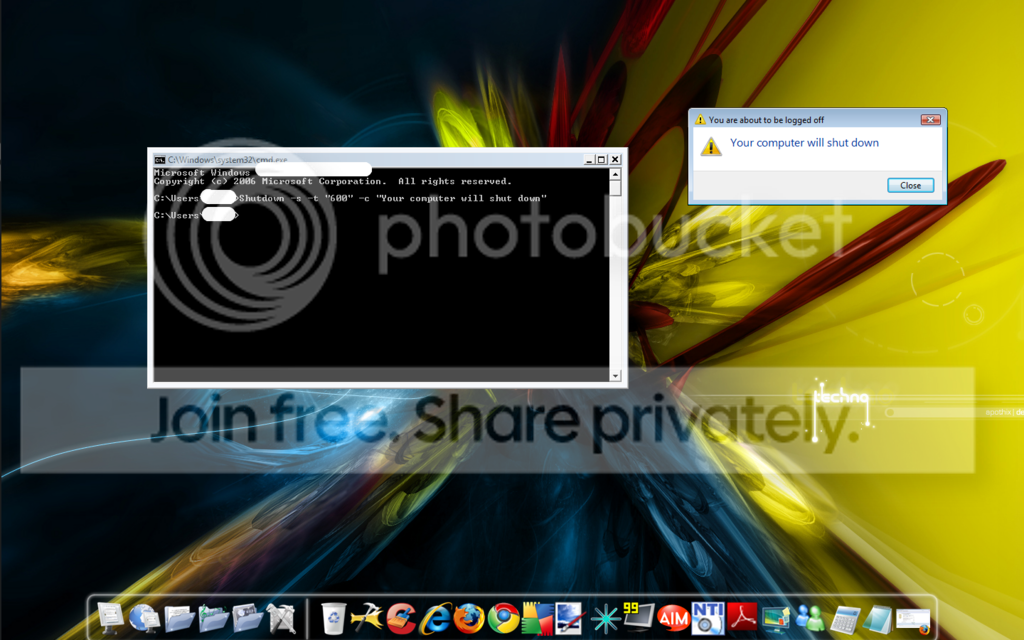
To disable this, open CMD, if not yet already opened, and do the following.
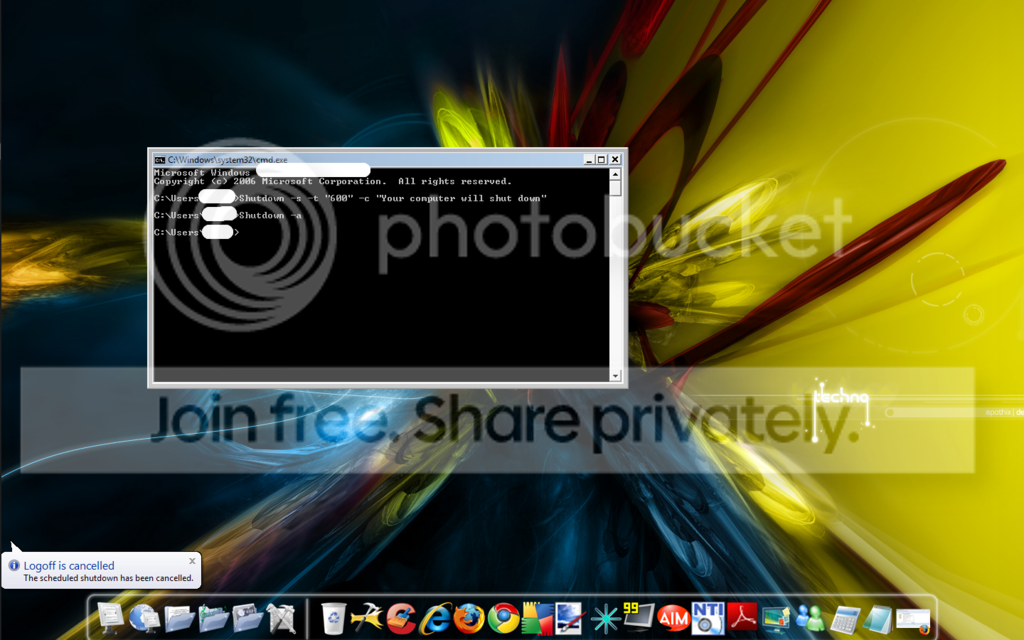
NOTICE: WINDOWS XP IS EXACTLY THE SAME, BUT THE WARNING IS DIFFERENT, IT'S JUST A BIG WARNING WITH AN X DISPLAYING HOW MANY SECONDS THERE ARE LEFT UNTIL SHUTDOWN!
|
|
|
|
|
|
Memories key Vice Captain
|
|
|
|
|
|
|
|
|
|
Memories key Vice Captain
|
Posted: Tue Feb 17, 2009 2:42 pm
What is essential in order to keep your computer clean, and working smoothly:
An Anti-virus, this is essential as it acts as a wall for your computer if properly updated, and if it is monitoring your PC. (This include, AVG, Norton Anti-virus, Kapersky, and McAfee) [There are many more great Anti-virus software, but I'm just naming the ones that come to my head at the moment.]
A firewall, this acts as a second wall for your PC, but of course it does not cause conflicts with your Anti-virus. (Some great software for firewalls are Zone Alarm, and Windows Firewall.) DISABLE your current firewall.>
Believe it or not, having cleanup software doesn't help much. Sure it helps, but usually it's not worth the cost of physical of virtual memory. Thought it's nice to have two or three.
LINK SCANNERS! This are a must have, the only one that I know that works very well is the AVG one included in the FREE Anti-virus. This can prevent you from entering a site which will expose you to a malicious code, software, or implant a virus in your PC.
|
|
|
|
|
|
|
|
|
|
|
|
|
|
|
Posted: Tue Feb 17, 2009 3:08 pm
WHAT NOT TO DOWNLOAD!
Torrents!
P2P sharing networks, this is because you may also catch viruses from this.
KeyGen's- Not to mention that they are illegal themselves, they are also, very very dangerous. This is because they are usually loaded with Trojans, and keyloggers. As well as backdoors which lead in more viruses.
Smiley's- Aww, but it's so cute! Yeah, well did you ever hear of curiosity killed the cat? This things claim that they have no viruses, but since you are agreeing to the license agreement (The article when you install stuff, that no one reads...), which clearly states that they MAY contain viruses. Please notice not all software like this has viruses, but mostly around 80% does.
Transformation packs. I.E: A program that will make your XP like a vista or etc... There are way simpler ways to do this manually, without the necessity of this software. This is because the people who write this things are not perfect, and can make mistakes in the Shells, registries or other important files. This will cause your computers more conflicts, it's really not worth it at all. In some future posts I'll show you how to easily change your style, or theme.
Youtube videos downloaders- Some are clean and safe, while the others are sneaky and evil. All I'm telling you is beware, I LOVE Youtube, but I'd rather just watch it online and run no risk.
Codec packs- Well see, I myself have done this and many others have as well to fix codec problems. Codecs are used to produce videos and filter them. Also used to decompress. If you are a video producer then you are sure to know what this is. All I'm saying is to know what your installing and doing before you do it.
Gaming Bots, macros, etc... -This are filled with Keyloggers which will steal your accounts, and things such as credit card and debit card numbers. Beware, play clean, and stay clean.
Just some notices, if you are not sure of some software, GOOGLE is your friend so is Yahoo and other popular search engines.
|
|
|
|
|
|
Memories key Vice Captain
|
|
|
|
|
|
|
|
|
|
Memories key Vice Captain
|
Posted: Tue Feb 17, 2009 3:16 pm
What, I personally have in my PC (laptop) that helps it be stable.
I have a launch manager, this is usually for things such as fast internet access, mail, etc..
CCleaner- One of my favorite programs, it's amazing! Used by many people as well. It cleans out your INDEX.DAT files which are files of websites you visited. The reason why I love this is that INDEX.DAT files take up space as they start accumulating over time. This program also cleans things such as crashes and many more data that is not needed. Usually takes 3-12 seconds to complete.
WARNING: DON'T USE THE REGISTRY CLEANER IF YOU ARE NOT SURE OF IT. I ALWAYS USE IT, BUT I BACKUP MY FILES ALWAYS!
AVG (Free edition)- This is a life safer just because of it's linkscanner and easiness to use. I use it a lot, and if your OS isn't very old, it won't take much to scan. Please note, compared to other Anti-viruses I have had in the past, this is the best, it's free, and doesn't slow down your computer.
Mozilla Firefox- This is great, especially if you strongly dislike Advertisements, you can easily block them with Ad-Block plus! But if you play Runescape, you can make an exception of disabling it. Also it has many more secure features over IE. Including it's enhanced security.
Spybot search & destroy- Decent program, searches rather quickly for malware. Just keep up to date with it.
Lavasoft Ad-aware 2009- It's also a decent program and works very well on detecting problems. Just keep up to date with it.
There are many more, but I can't think of them to be honest.
I have many more things, but I don't really like going through all names, sorry.
|
|
|
|
|
|
|
|
|
|
|
|
|
|
|
Posted: Tue Feb 17, 2009 3:24 pm
Software that I think is very important or just nice to have for day use.
MSN- Interact with your friends.
AIM-Interact with your friends as well biggrin .
Fraps, hypercam, camstudio etc...- this is great for video making I must admit.
Windows sidebar- Comes with vista, it's great to have.
Rocketdock- Yes, as you see in the bottom of my screen I have a docklet (Used in MAC.) Most people I asked personally dislike this and much rather prefer the normal taskbar, but I'm one of those people that don't biggrin .
Picasa- great to have for picture viewing, and some rookie editing, this is nice because of it's smooth interface.
Google Earth- Very nice to have to STALK PEOPLE... I mean it's good to see how your destination looks like if you are heading somewhere, or just to explore around.
Paint.NET, Gimp, and phostoshop- I don't have photoshop anymore, but I do have Paint.NET, and Gimp. This are great photo editing programs, they are free, and very easy to work with. Especially if you are an artistic person, and like to play around with layers or opacity.
That's all I can think of that I use a lot on my PC. Other than security software and Firefox.
|
|
|
|
|
|
Memories key Vice Captain
|
|
|
|
|
|
|
|
|
|
Memories key Vice Captain
|
Posted: Tue Feb 17, 2009 3:30 pm
How I personalized my Desktop/ Specifications.This is how my desktop looks like, and what I usually use is in the DOC. 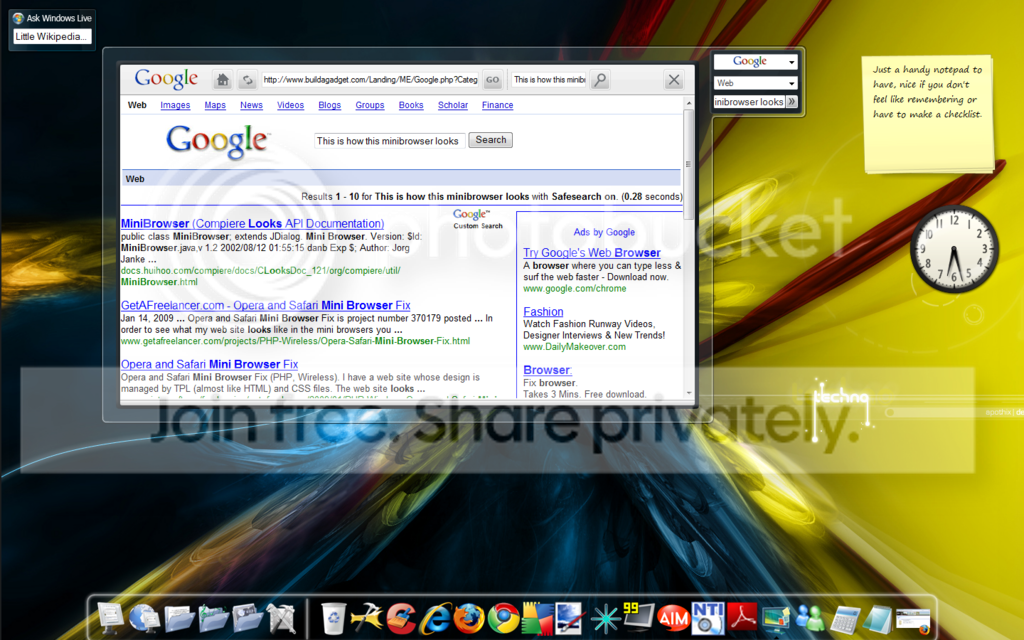 Yes, I'm running on a laptop with only around 1.73GHZ and 1 Gig, I also have Vista. Seems pretty good for just those minor specs right biggrin ? This is why personalizing it to fit your needs is great, and see you don't even need a transformation pack!
|
|
|
|
|
|
|
|
|
|
|
|
|
|
|
Posted: Tue Feb 17, 2009 3:36 pm
NOTICES
Don't have more than one Anti-virus they will conflict each other, and your computer performance will go down the toilet.
Check for viruses every month, or weekly if possible.
Don't accept files from people you don't know, not only can this grant you a virus, but it can also be dangerous for you.
Don't give your IP address out to anyone, this is like your phone number, and can grant access to your PC.
Be aware of what your downloading, as I said always GOOGLE or ask, you're going to be considered smart instead of insulted. Research is great.
|
|
|
|
|
|
Memories key Vice Captain
|
|
|
|
|
|
|
|
|
|
Memories key Vice Captain
|
Posted: Tue Feb 17, 2009 3:38 pm
COMING Soon...
How to remove a virus off your computer.
Removing any malware.
How to use task manager properly.
|
|
|
|
|
|
|
|
|
|
|
|
|
|
|
Posted: Tue Feb 17, 2009 3:41 pm
Reserved for future post.
|
|
|
|
|
|
Memories key Vice Captain
|
|
|
|
|
|
|
|
|
|
Memories key Vice Captain
|
Posted: Tue Feb 17, 2009 3:42 pm
Reserved for future post.
|
|
|
|
|
|
|
|
|
|
|
|
|
|
|
Posted: Tue Feb 17, 2009 3:43 pm
|
Memories key Vice Captain
|
|
|
|
|
|
|
|
|
|
Doctor Nitrus Brio Vice Captain
|
Posted: Tue Feb 17, 2009 9:09 pm
Wow, Hey! thanks for posting this! I have learned alot from this.
I am not a computer wiz; so yeah. Thanks! heart heart heart
|
|
|
|
|
|
|
|
|
|
|
|
|
|
|
Posted: Wed Feb 18, 2009 1:06 pm
You're very welcome. Thanks for commenting xD. Well, if you want to suggest something, please do it. Something such as Graphic card help, Processor help, BIOS, or anything else that may fit this criteria.
|
|
|
|
|
|
Memories key Vice Captain
|
|
|
|
|
|
|
|
|
|
|
|
|


 Reply
Reply