Welcome to Gaia! ::

Did you actually do this?

Yes! Thanks! 0.22033898305085 22.0% [ 26 ]
No! What a stupid thread. 0.093220338983051 9.3% [ 11 ]
I haven't yet but might. 0.45762711864407 45.8% [ 54 ]
Poll whore. 0.22881355932203 22.9% [ 27 ]
Total Votes:[ 118 ]
1 2 3 4 >

Rules of the Thread


My first thread with a purpose!!
I made this once in the Gaming Discussion and it got moved to the Chatterbox. THE CHATTERBOX!!! Come on Gaia, the Chatterbox isn't where anyone goes to find info.
As far as i know this topic hasn't been covered. If it has then please someone tell me!! (a link to the original would be nice to)

- Bumping not allowed, unless this is off the front page.
- Conversations are welcome but perhaps out of place.
- Don't PM me about items in my invo simply cuz you saw it here. I'M NOT SELLING, DONATING, OR TRADING! Repeat offenders will be reported.
- All them other Gaia rules apply here.

This is meant to be a informative thread more then conversation place.
Welcome to How to Organize Your Game Invo


On Gaia there are many games and game items to go with them. From credits to crumpled paper, fish to flowers, we all have some. However Gaia has left us in a state of chaos when it comes to their placement. Until Now!
This guide is intended to put a end to the chaos that is our game inventory screens! No more head aches scanning along till you find the desired item! No more *sighs* when you need to find how many of a item you have! NO MORE EYE PAINING INVO SCREENS!

~What You'll Need~
- 1 of every basic game item you want sorted
- 1 mule account or friend
(if its a freind make sure they understand your using them to send trades)
- about 1 hour
- 10k or less
Optional (to help you buy the first requirement)
- a trading pass (1000g)
And thats it!
Step 1


Okay so you got the drive to organize your invo, but do you have the items? In order to keep your invo fairly clean and tidy your going to want to make sure you don't have any surprise items pop in. To help you make sure you've got the basics i've complied a list of all the game items minus event or quest related ones. (at least all that i know of)

Fish Related Items
Grade A bait, Grade D bait, Grade F bait
Sand Boldur, Slate Boldur, Stone Boldur
Black Rocque Biter, Pyrite Biter, Bluestone Biter
Brown Pebbo Feeder, Black Pebbo Feeder, White Pebbo Feeder
Spicy Tuna, Dicy Tuna, Icy Tuna
Cool Rainbow Trout, Frozen Rainbow Trout, Warm Rainbow Trout
Pink Seedkin, Blue Seedkin, Green Seedkin
Gray Striper, Blue Striper, Green Striper
Blue Bass, Green Bass, Brown Bass
Red Guppy, Orange Guppy, Yellow Guppy
Old Can, Old Boot, Big Old Tire
(there are rare fish of course)

Credits and Tickets
Token, Ticket
Doctorate's Credit*, Master's Credit, Bachelor's Credit

Ink
Black Ink, Blue Ink, Green Ink, Red Ink, Yellow Ink, Brown Ink
(there are more but they require mixing or rare bugs)

Bugs
Red Butterfly, Blue Butterfly, Yellow Butterfly
Blue Dragonfly, Red Dragonfly, Green Dragonfly
Brown Beetle, Red Beetle, Blue Beetle
Red Fly, House Fly
Grasshopper, Cricket
Cicada, Firefly
(there are rare bugs to of course)

Paper
Crumpled Paper Bag, Crumpled Newsprint
Crumpled Newpaper, Old Crumpled Newspaper, Dirty Crumpled Newspaper
Crumpled Zerox Paper White, Crumpled Zerox Paper Blue, Crumpled Zerox Paper Goldenrod
Crumpled Blue Construction Paper, Crumpled Green Construction Paper, Crumpled Red Construction Paper

Flowers
Sunflower
Yellow Daffodil, Pink Daffodil, Blue Daffodil
Blue Daisies, Purple Daisies, White Daisies
White Carnation, Blue Carnation, Red Carnation

Before continuing on, make sure you have 1 of each of the items listed above.
*if you wish to skip this due to it being to expensive i think you'd be okay
Step 2


This is were we actually organize. Before jumping into procedure let me try to get you to grasp the concept.
When a game item is put in your invo, and there aren't any of that kind in it in previously, it gets added to the bottom of the invo. So what we're going to do is take out the item and put it back in, in order. Thereby organizing it. We do so by starting to trade the items to an account, then canceling.

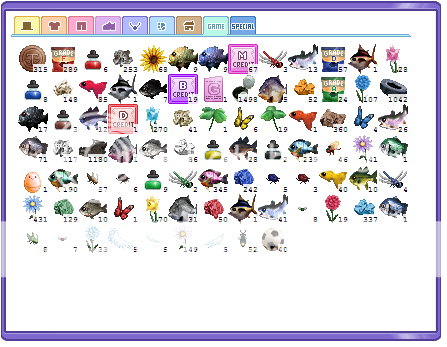
We start with this:
User Image

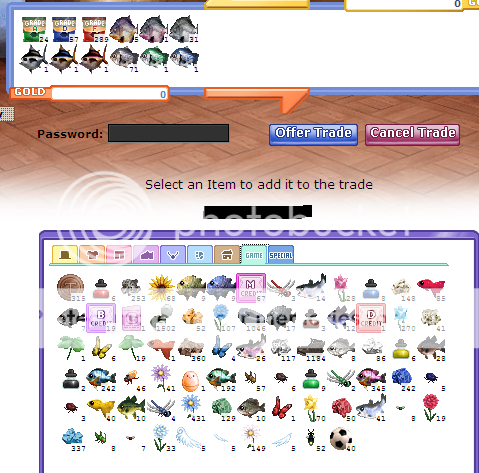
What a mess, huh? Lets solve that. Go to the Bank and start a trade with your mule, or good friend. (again make sure to tell them your doing it with them so they don't think your actually give them the stuff) Now decide the order you want your invo in. Since i'm the example and i like fishing, i chose to sort my bait and fish by size and lake first. So i filled out my first trade accordingly.
Like shown:
User Image

I send the trade, and the items are no longer in my invo. They are subtracted and now in the transition between me and the mule, or friend. Now all we have to do is cancel this trade and their back in my invo in the order i placed them in the trade.

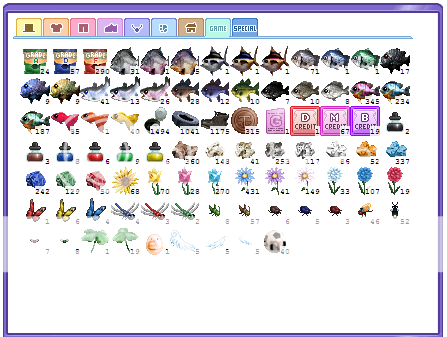
From there its a matter of rinse and repeat. Until finally we have this nicely organized invo.

User Image

Notes
I suggest having event items and quest items at the end. That way when new ones come out their already partially organized! Other then that the order is up to you.
ALWAYS LEAVE ONE!!!! If one doesn't remain in your invo it will not stay organized! When selling always be sure to leave 1 of the item left. Other wise you'll have to do it all over again.

And thats how you do it! Fairly simple once you get the hang of it. 3nodding
Links


Visit these other fine threads!

User Image - Blocked by "Display Image" Settings. Click to show.

Post here or pm me if you'd like to be here.
Open to comments, suggestions, and the like. heart
What a failure of a thread.
Give it some time, I'm sure some people will find it useful smile I know the technique - before the inventory arranger it was the only way to organise your inventory. Nice to see it explained. Good idea to make sure you have most items to stop it becoming unorganised again.
Somniloquy
Give it some time, I'm sure some people will find it useful smile I know the technique - before the inventory arranger it was the only way to organise your inventory. Nice to see it explained. Good idea to make sure you have most items to stop it becoming unorganised again.


lol thanks i'm just impatient. xp
i'm to new to know what it was like before the inventory arranger lol i'm kinda surprised no one else (that i know of) has explained it for the n00bs to use then.
Holy crap, I never would've thought of that.
This is good. Thanks.
Not meaning to be rude or anything but why can't you use the item organizer or whatever it is called. It takes a lot les time then logging in and out and making and accepting trades.

Quick Reply

Submit
Manage Your Items
Other Stuff
Get GCash
Offers
Get Items
More Items
Where Everyone Hangs Out
Other Community Areas
Virtual Spaces
Fun Stuff
Gaia's Games
Mini-Games
Play with GCash
Play with Platinum
//
//

Join Now

// //

Have an account? Login Now!

//
//